Home/Documents

Document tracking, sharing and e-signaturesDocument requests, sharing, and signing

Collect the files you need with a private upload checklist. Share documents, review recorded page activity, and request signatures when the agreement is ready. Keep document requests, shared files, and completed signature records in one workspace.

Track your first documentExplore document requests
Free includes 5 document requests total. Explore plans for the full document toolkit.See plans
Document analytics in the Elite Mail Works dashboard: every shared document with its links, views and page coverage
  • Request

    Collect the files you need with a private upload checklist

  • Share and track

    Controlled links with page-by-page viewing activity

  • Sign

    Signature requests that end with a completion record

Why it mattersSee how it worksWorkflow examplesGet startedGood to knowQuestions

Why it matters

An attachment disappears the moment you send it

A controlled link stays yours. You can see how it was read, change who can open it and withdraw it later.

Email attachments

  • No visibilityYou cannot tell whether the proposal was opened.
  • No controlOnce sent, a file can be forwarded to anyone.
  • Scattered recordsRequests, versions and signed copies live in different threads.

With Elite documents

  • Page-level activitySessions, time on each page and downloads.
  • Access you can changeExpiry, download rules, watermarks and revocation.
  • One recordThe request, the document and the signed PDF together.

How it works

Follow a document through review

Set access before sharing, then review viewing sessions. Keep the signed PDF with its completion record.

01Activity

Review page activity

See recorded sessions, page activity, and downloads. Use them as context for your next conversation.

Document report with a viewer expanded to show engagement by page, time viewed, coverage and download status

02Access

Set access for each link

Choose expiration and download settings. Add a recipient watermark or revoke future access through the link.
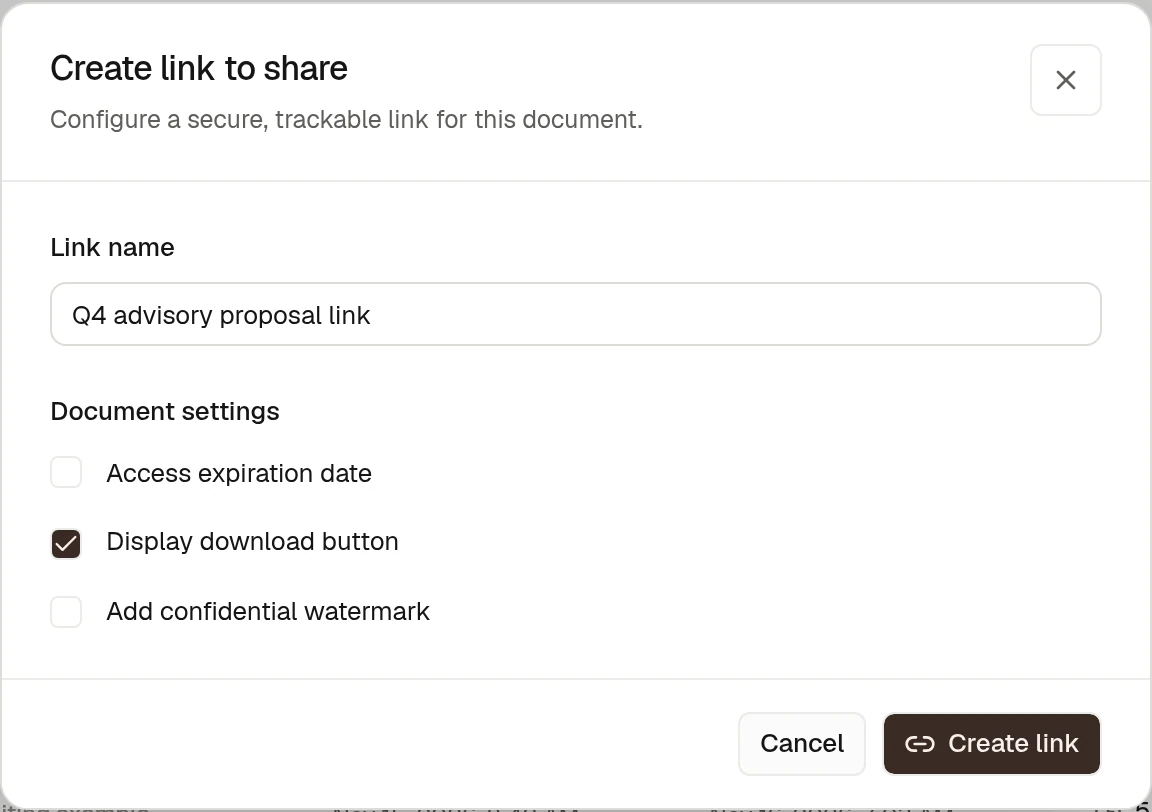
Create link dialog with document settings for an access expiration date, the download button and a confidential watermark

03Signatures

Collect signatures

Place fields and assign signers. Track progress and keep the completed PDF with its audit record.

Signing page asking the signer to enter a one-time code sent to their email before reviewing the document

Examples

Tools for each document stage

Document requests

Send a checklist and private upload link. Review submitted files and ask for replacements.

Explore this feature

Document tracking

See sessions, page-level attention, dwell time, downloads, and return visits

Explore this feature

Secure sharing

Control expiration, download permissions, maximum views, viewer identity, and revocation

Explore this feature

E-signatures

Place fields, route the request, verify signers, send reminders, and keep the completed record

Explore this feature

Get started

Set up in four steps

  1. Request or upload

    Collect files with a checklist, or add your own document

  2. Set access

    Choose expiry, downloads and a recipient watermark

  3. Share the link

    Send it in a tracked email

  4. Review and sign

    Read the page activity, then request signatures

Track your first documentExplore workflow examples

Good to know

Clear about the limits

We would rather you trust Elite than be surprised by it

  1. Document analytics use a tracked sharing link and the Elite viewer. A downloaded attachment does not send the same activity.
  2. A view shows recorded activity. Acceptance and signature completion are separate events.
  3. Revoking a link stops future access through that link. It cannot recall a copy someone already downloaded or captured.
  4. Free includes 5 document requests in total

Questions

Common questions

Can I track an ordinary attachment?

Document analytics use a tracked sharing link and the Elite viewer. Use the controlled link to see page-level attention; a downloaded attachment does not send the same activity.

Does a view mean someone accepted the proposal?

Views and time on a page show recorded activity. Acceptance and signature completion are separate events.

Can I withdraw a document after sharing it?

Revoke a shared link to stop future access through that link. Revocation cannot recall a copy someone already downloaded or captured.

Get started

Share your next proposal

Free includes 5 document requests total. Explore plans for the full document toolkit.

Track your first documentCompare plans
Elite Mail WorksElite Mail Works
Email TrackerWorkflowsSolutionsPricing
Log inStart free

Tracking

Elite Email TrackerFollow-up RemindersEmail Analytics

Outreach

CampaignsMail MergeEmail TemplatesVideo Messages

Requests & documents

Document RequestsVideo RequestsSignature RequestDocuments overviewDocument TrackingSecure Document SharingConfidential Watermark

Workspace

CRM for EmailTracker BlockingWorkflowsIntegrationsAI connections

Get Elite Mail Works

Chrome ExtensionEdge ExtensionFirefox ExtensionGmail™ Mobile Add-onOutlook Add-iniPhone & iPad AppAndroid App

Resources

BlogSign PDF OnlineSignature StudioEmail signature templatesGmail™ signature generatorOutlook signature generatorVideo RecorderEmail Tracking GuideWorkflow ExamplesTutorialsCustom EmailFAQs & Help CenterComparisons
View all features
Product
Elite Email TrackerFollow-up RemindersEmail AnalyticsCampaignsMail MergeEmail TemplatesVideo MessagesDocument RequestsVideo RequestsSignature RequestDocuments overviewDocument TrackingSecure Document SharingConfidential WatermarkCRM for EmailTracker BlockingWorkflowsIntegrationsAI connections
Download
Chrome ExtensionEdge ExtensionFirefox ExtensionGmail™ Mobile Add-onOutlook Add-iniPhone & iPad AppAndroid App
Resources
BlogSign PDF OnlineSignature StudioEmail signature templatesGmail™ signature generatorOutlook signature generatorVideo RecorderEmail Tracking GuideWorkflow ExamplesTutorialsCustom Email
WorkflowsSolutionsPricing
Log inStart free
Ask about Elite Mail Works on
Elite Mail WorksElite Mail Works
  • Download on the App Store
  • Get it on Google Play

Company

ContactAbout UsBrandingCareersPress

Features

Elite Email TrackerFollow-up RemindersEmail AnalyticsCampaignsMail MergeEmail TemplatesVideo MessagesDocument TrackingSecure Document SharingConfidential WatermarkSignature RequestCRM for EmailTracker BlockingDocument RequestsVideo Requests

Solutions

StartupsLawyers & AttorneysFreelancersHRTeachers & ProfessorsReal EstateMarketersSmall BusinessSales ProfessionalsAccountantsElite Mail Works for TeamsProposal Software

Download

Chrome ExtensionEdge ExtensionFirefox ExtensionGmail™ Mobile Add-onOutlook Add-iniPhone & iPad AppAndroid App

Resources

BlogSign PDF OnlineSignature StudioEmail signature templatesGmail™ signature generatorOutlook signature generatorVideo RecorderEmail Tracking GuideWorkflow ExamplesTutorialsCustom EmailWorkflowsDocuments overviewAI actionsIntegrationsEnterprisePricingFAQsComparisonsPrivacyTermsSecurity
  • Available in the Chrome Web Store
  • Add to Slack
  • Available on Microsoft Marketplace: Outlook add-in
  • Get it from Microsoft Edge
  • Get the Firefox add-on
  • Get it from Google Workspace Marketplace: Gmail add-on
  • Powered by AWS: system email delivery using Amazon SES
  • Protected by Cloudflare
  • Powered by Stripe: payment processing
  • elitemailsuite.com: green hosting through Cloudflare, checked by Green Web Foundation
  • Product HuntFind us onProduct Hunt

© 2026 Elite Mail Works. All rights reserved.

Gmail™, Google Workspace, Chrome, and Android are trademarks of Google LLC. Microsoft, Microsoft Edge, and Outlook are trademarks of the Microsoft group of companies. Yahoo and Yahoo Mail are trademarks of Yahoo Inc. Elite Mail Works is an independent product and is not affiliated with or endorsed by these companies.