Home/Features/Tracker Blocking

Email tracker blocking and detectionEmail tracker blocking

Detect known trackers in incoming email. Choose which ones to block in your browser.

Turn on tracker protectionSee how it works
Create a free account. Available on Pro.See plans
  • Know what was found

    See the type of tracker detected in the message

  • Keep useful content

    Block known trackers while allowing ordinary images

  • Make your own choice

    Manage incoming protection separately from the tracking on messages you send

Works with Chrome Edge Firefox Gmail™ Outlook Yahoo Mail

Why it mattersHow it worksGet startedUse casesGood to knowQuestions

Why it matters

You track the email you send. You should decide who tracks you.

Many newsletters and sales emails carry hidden pixels. Blocking every image breaks your inbox. Elite identifies known trackers and blocks only those.

Blocking all images

  • Broken emailsLogos, charts and product photos disappear with the pixels.
  • No explanationYou never learn which messages were tracking you.
  • All or nothingNo way to allow a sender you trust.

With Elite Mail Works

  • Targeted blockingKnown tracking pixels are blocked. Ordinary images still load.
  • See what was foundEach message shows the type of tracker detected.
  • Allow rulesMake exceptions for the senders and tools you rely on.

How it works

Privacy for the email you receive

Incoming protection sits beside outgoing tracking, with separate controls for each

01In your inbox

A visible boundary around incoming trackers

Detect and block hidden tracking in incoming email while keeping your normal inbox workflow

  • Works where you read mail. The extension checks incoming messages in Gmail™, Outlook and Yahoo Mail.
  • A privacy receipt. See which trackers were found in the message you opened.
  • Blocked before loading. A blocked tracker does not learn your IP address, device or the time you opened.
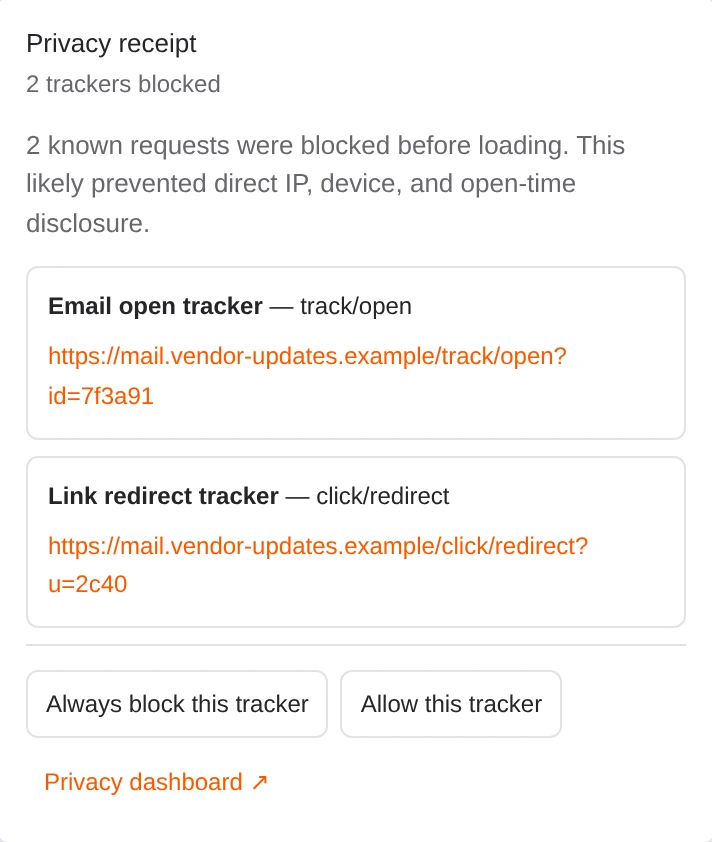
Privacy receipt in the inbox listing two blocked trackers, what was detected, and buttons to always block or allow each one

02Detection detail

See what was detected

Inspect tracker activity and distinguish it from the visible message content

  • Tracker name. The service behind each tracker is named where it is known.
  • What was detected. The detection and the address it pointed to.
  • Per-message view. Open the receipt for the message in front of you.

03Your rules

Make the privacy choices that fit your inbox

Choose how strict blocking is, and add your own rule for any tracker

  • Detector and blocker. Turn detection and blocking on or off separately.
  • Aggressive, light or custom. Pick the blocking level that suits your inbox.
  • Per-tracker rules. Always block a tracker, or allow it.
  • Detection is free. Automatic blocking and custom rules are part of Pro.

04Separate controls

Keep incoming protection and outgoing tracking separate

Choose how you protect incoming email and how you track your own messages with independent controls

  • Incoming and outgoing are independent. Blocking trackers in mail you receive does not change tracking on mail you send.
  • Choose each on its own. Use either feature without the other.
  • Clear about limits. Blocking covers known trackers. New ones can appear before they are recognised.

Get started

Set your preferences before the next email

Install the extension in Chrome, Edge, or Firefox, review incoming tracker protection, and choose the settings that suit your inbox

  1. Open a message

    Review known trackers detected in supported webmail

  2. Check the detection

    See the recognized tracker type in the message controls

  3. Enable blocking

    Use Pro protection to block matched tracking requests

  4. Adjust preferences

    Review or disable protection in the extension settings

Create a free account. Available on Pro.

Turn on tracker protectionReview privacy controls

Use cases

Read your email with more control

Understand what is being requested before sharing the signal

01

Open newsletters more privately

Block recognized beacons before their remote request tells the sender that the message was displayed

02

Understand an unfamiliar message

See which known tracker type was detected before deciding whether to load remote content

03

Avoid a broken inbox

Use targeted signatures and allow rules instead of disabling every image in every message

What's included

  • Known tracker detection
  • Explanations
  • Safe allow rules
  • Per-message visibility
  • Chrome/Edge/Firefox support

Good to know

Clear about the limits

We would rather you trust Elite than be surprised by it. These are the boundaries worth knowing before you rely on it.

Security and privacy at Elite

  1. No signature list can identify every tracker, especially a new or first-party custom pixel. Detection is a best-effort classification, not a guarantee of invisibility.
  2. Blocking can reduce sender tracking but cannot undo information already exposed by clicking a link, replying, downloading remote content, or using a provider that prefetches it upstream

Keep going

Works better together

Every Elite feature shares the same contacts, messages and history, so the next step is already in context

Elite Email Tracker

See opens and clicks with context about automated activity

Explore

Email Analytics

See your email activity in one clear dashboard

Explore

Secure Document Sharing

Share private files with access controls

Explore

Questions

Tracker Blocking FAQ

Answers about setup, compatibility, privacy, and day-to-day use

Visit the help center

Does tracker blocking block all images?

No. The design uses known signatures and scoped request rules, with allow rules intended to preserve ordinary images and privacy proxies.

Which browsers are supported?

The extension ships separate Chrome, Edge, and Firefox builds with browser-appropriate background and rule behavior.

Can it detect every hidden tracker?

No. Known services and patterns can be detected, but a new, custom, or first-party beacon may not match the current signature set.

Does the extension read my cookies?

No. The published permission model does not require cookie access for tracker detection and blocking.

Get started

Put incoming tracking under your control

Understand what is being requested before sharing the signal

Turn on tracker protectionCompare plansView all features
Elite Mail WorksElite Mail Works
Email TrackerWorkflowsSolutionsPricing
Log inStart free

Tracking

Elite Email TrackerFollow-up RemindersEmail Analytics

Outreach

CampaignsMail MergeEmail TemplatesVideo Messages

Requests & documents

Document RequestsVideo RequestsSignature RequestDocuments overviewDocument TrackingSecure Document SharingConfidential Watermark

Workspace

CRM for EmailTracker BlockingWorkflowsIntegrationsAI connections

Get Elite Mail Works

Chrome ExtensionEdge ExtensionFirefox ExtensionGmail™ Mobile Add-onOutlook Add-iniPhone & iPad AppAndroid App

Resources

BlogSign PDF OnlineSignature StudioEmail signature templatesGmail™ signature generatorOutlook signature generatorVideo RecorderEmail Tracking GuideWorkflow ExamplesTutorialsCustom EmailFAQs & Help CenterComparisons
View all features
Product
Elite Email TrackerFollow-up RemindersEmail AnalyticsCampaignsMail MergeEmail TemplatesVideo MessagesDocument RequestsVideo RequestsSignature RequestDocuments overviewDocument TrackingSecure Document SharingConfidential WatermarkCRM for EmailTracker BlockingWorkflowsIntegrationsAI connections
Download
Chrome ExtensionEdge ExtensionFirefox ExtensionGmail™ Mobile Add-onOutlook Add-iniPhone & iPad AppAndroid App
Resources
BlogSign PDF OnlineSignature StudioEmail signature templatesGmail™ signature generatorOutlook signature generatorVideo RecorderEmail Tracking GuideWorkflow ExamplesTutorialsCustom Email
WorkflowsSolutionsPricing
Log inStart free
Ask about Elite Mail Works on
Elite Mail WorksElite Mail Works
  • Download on the App Store
  • Get it on Google Play

Company

ContactAbout UsBrandingCareersPress

Features

Elite Email TrackerFollow-up RemindersEmail AnalyticsCampaignsMail MergeEmail TemplatesVideo MessagesDocument TrackingSecure Document SharingConfidential WatermarkSignature RequestCRM for EmailTracker BlockingDocument RequestsVideo Requests

Solutions

StartupsLawyers & AttorneysFreelancersHRTeachers & ProfessorsReal EstateMarketersSmall BusinessSales ProfessionalsAccountantsElite Mail Works for TeamsProposal Software

Download

Chrome ExtensionEdge ExtensionFirefox ExtensionGmail™ Mobile Add-onOutlook Add-iniPhone & iPad AppAndroid App

Resources

BlogSign PDF OnlineSignature StudioEmail signature templatesGmail™ signature generatorOutlook signature generatorVideo RecorderEmail Tracking GuideWorkflow ExamplesTutorialsCustom EmailWorkflowsDocuments overviewAI actionsIntegrationsEnterprisePricingFAQsComparisonsPrivacyTermsSecurity
  • Available in the Chrome Web Store
  • Add to Slack
  • Available on Microsoft Marketplace: Outlook add-in
  • Get it from Microsoft Edge
  • Get the Firefox add-on
  • Get it from Google Workspace Marketplace: Gmail add-on
  • Powered by AWS: system email delivery using Amazon SES
  • Protected by Cloudflare
  • Powered by Stripe: payment processing
  • elitemailsuite.com: green hosting through Cloudflare, checked by Green Web Foundation
  • Product HuntFind us onProduct Hunt

© 2026 Elite Mail Works. All rights reserved.

Gmail™, Google Workspace, Chrome, and Android are trademarks of Google LLC. Microsoft, Microsoft Edge, and Outlook are trademarks of the Microsoft group of companies. Yahoo and Yahoo Mail are trademarks of Yahoo Inc. Elite Mail Works is an independent product and is not affiliated with or endorsed by these companies.