Home/Features/CRM for Email

CRM for email and contact historyContact management for email

Keep contact notes, tags, and lists in one workspace. Review available activity before you write.

Organize your contactsSee how it works
Create a free account. Available on Pro.See plans
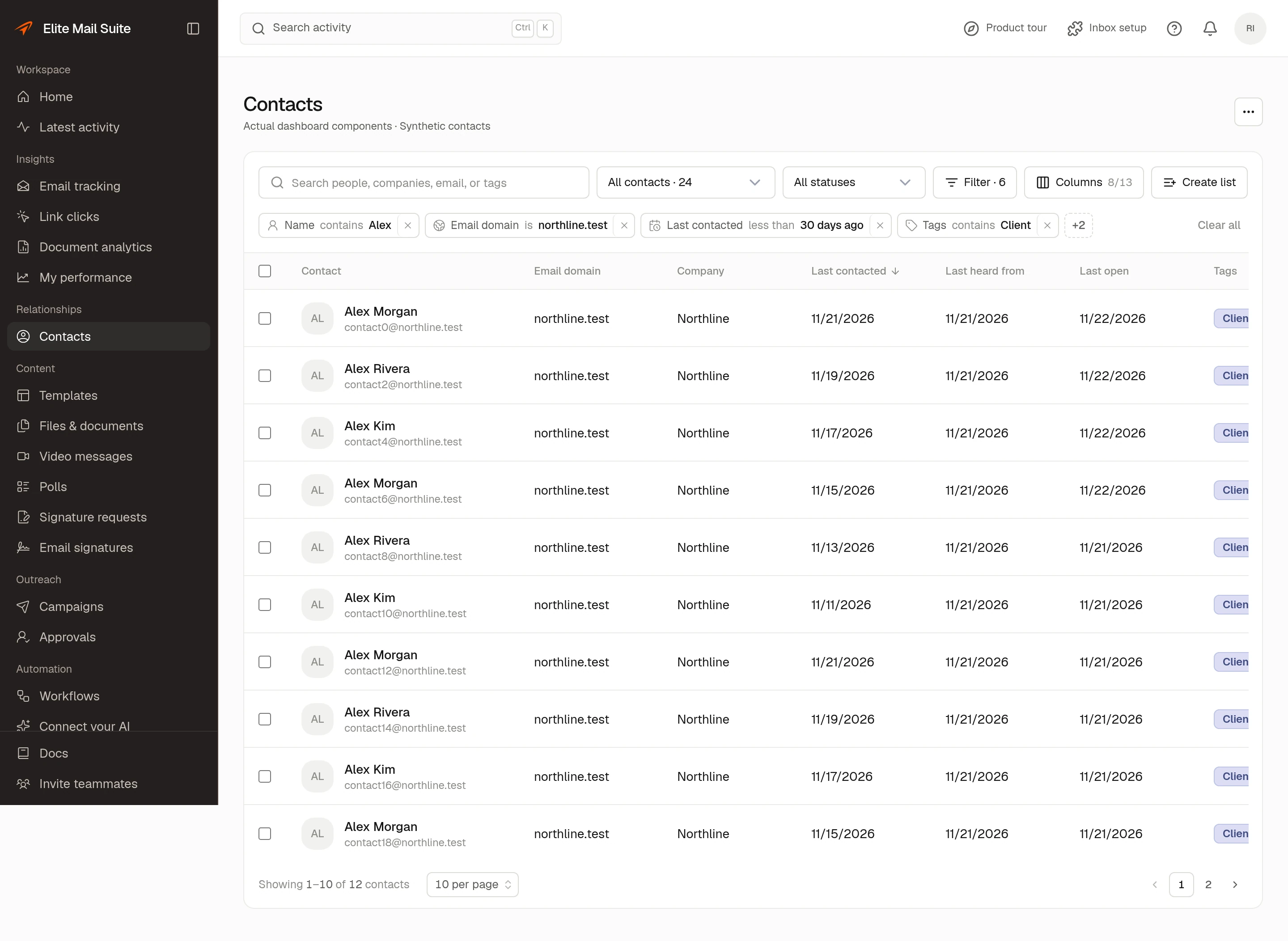
Contacts in the Elite Mail Works dashboard: each contact with its email domain, company, last contacted, last heard from, last open and tags
  • Keep the useful details

    Bring contact details, notes, tags, and lists into one workspace

  • Build the right audience

    Use your saved contacts in personalized outreach

  • Review available activity

    Keep shared work close to the contact. Gmail™ mailbox history stays on your device.

Works with OutlookCSVGoogle SheetsCampaignsDocuments

Why it mattersHow it worksGet startedUse casesGood to knowQuestions

Why it matters

A CRM is only useful if it knows what happened in your inbox

Most CRMs depend on someone logging every email by hand. Elite starts from the conversation, so contact details, notes and shared files are already in one place when you write.

A separate CRM

  • Manual loggingUpdates happen when someone remembers, which is rarely.
  • Context in another tabYou switch tools to find out what was last said.
  • Lists that go staleExports to your email tool are out of date the next day.

With Elite Mail Works

  • Contacts beside your emailDetails, notes, tags and lists in the same workspace.
  • Activity on the contactMessages, shared files and recent engagement in one timeline.
  • Lists ready for outreachSend a personalized campaign to any saved list.

How it works

Know the person before you write

Contact details, shared work and next steps stay together

01Contact record

The relationship behind the next email

Bring contact details, notes, shared files, and recent activity together before you write

  • Six tabs per contact. Activity, next steps, attachment drive, tracked PDFs, signed PDFs and profile.
  • Recent activity. Tracked emails with their opens and clicks, newest first.
  • Tags. Label a contact and filter by the label later.
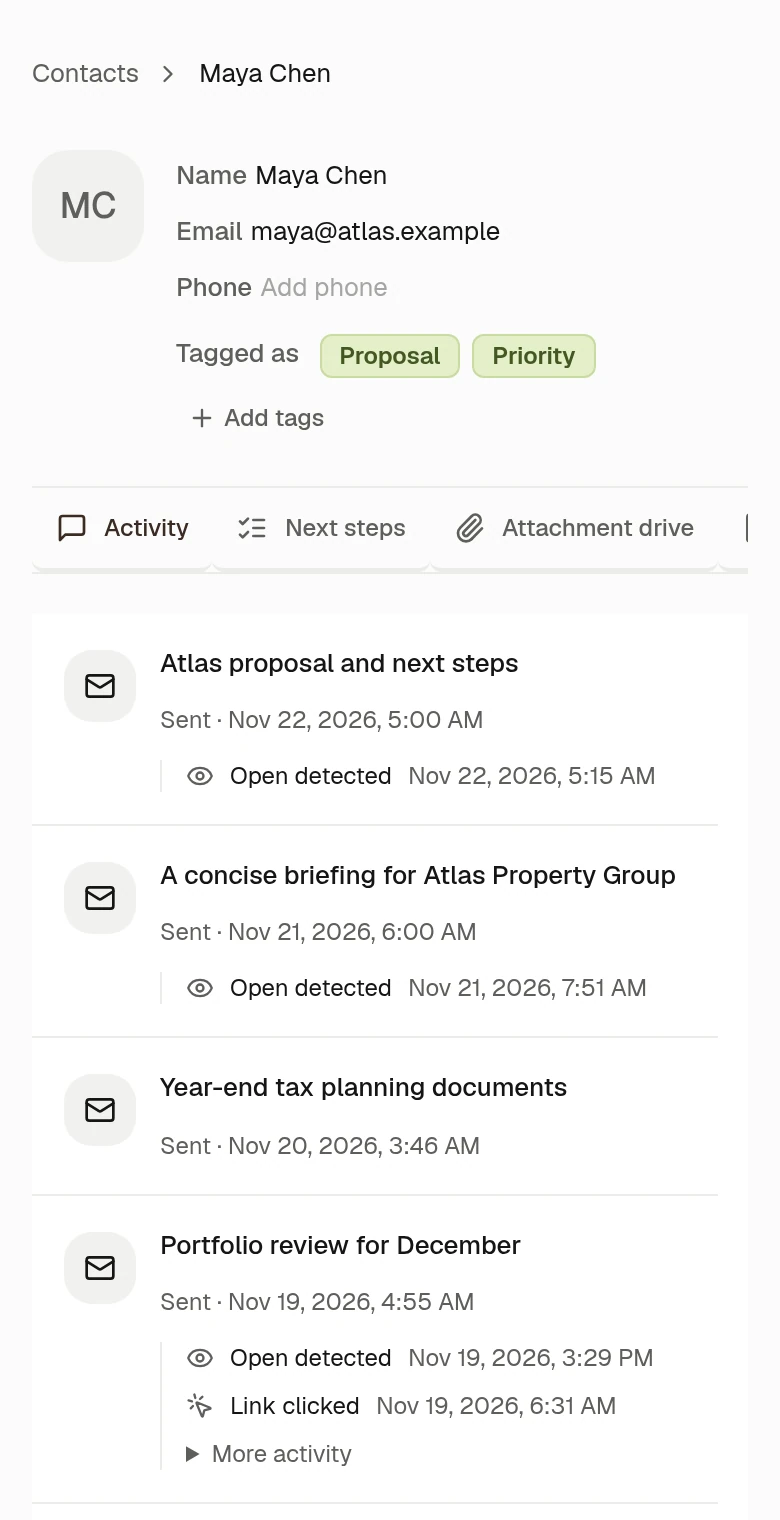
Contact record for Maya Chen with tags, tabs and a timeline of tracked emails with their opens and clicks

02Accounts and lists

Keep the people in an account connected

Organize contacts with company details, tags, and lists so related conversations stay easy to find

  • The columns you need. Email domain, company, last contacted, last heard from, last open and tags.
  • Import your contacts. From a file, pasted addresses, Google Sheets or Google Contacts.
  • Subscribed or unsubscribed. Suppression state is kept with each contact.
Contacts table with company, last contacted, last heard from, last open and tags

03From list to outreach

Turn an organized list into useful outreach

Select a relevant audience from your contacts and carry it into personalized email

  • Select an audience. Filter by tag, company or activity and save the result as a list.
  • Personalize from the record. Contact fields fill the variables in your message.
  • Suppression respected. Unsubscribed contacts stay out of campaigns.
Contacts table with active filters applied above the list

04Notes and consent

Keep the details that make follow-up personal

Notes live on the contact's profile, beside the consent tools you need for tracked documents

  • Notes that stay. Add context to the profile for the next conversation.
  • A timeline per contact. Every tracked message and its activity in order.
  • Consent tools. Send a consent request or ask permission for document analytics.

Get started

Bring your active relationships into view

Add the people you are working with, group them into useful lists, and save the details you will want before the next conversation

  1. Add your contacts

    Enter contacts, upload CSV, or import from Google Contacts or a spreadsheet you select

  2. Organize the list

    Add notes and tags, then group contacts for your work

  3. Review available activity

    Check recorded outreach activity and supported Outlook history before writing

  4. Connect your CRM

    Use a supported integration to work with your CRM contacts and activity

Create a free account. Available on Pro.

Organize your contactsOrganize your first contact list

Use cases

Know the history before you reach out

Pick up the relationship where the last conversation left off

01

Remember the whole account

Open a contact to find recent messages, shared files, and notes before the next conversation

02

Create working lists

Group customers, candidates, partners, or prospects for responsible individualized outreach

03

Find the file, not the thread

Use the attachment and shared-file index when you remember the document but not the subject line

What's included

  • Manual and CSV contacts
  • Picker-selected Sheets
  • Independent contact activity
  • Outlook mailbox context
  • Notes and suppression state

Good to know

Clear about the limits

We would rather you trust Elite than be surprised by it. These are the boundaries worth knowing before you rely on it.

Security and privacy at Elite

  1. Gmail™ mailbox history stays on your device and is excluded from cloud contact timelines, CRM sync, and cloud AI

Keep going

Works better together

Every Elite feature shares the same contacts, messages and history, so the next step is already in context

Campaigns

Send personalized campaigns from your own inbox

Explore

Follow-up Reminders

Know when it is time to follow up

Explore

Email Analytics

See your email activity in one clear dashboard

Explore

Questions

CRM for Email FAQ

Answers about setup, compatibility, privacy, and day-to-day use

Visit the help center

Can I import Google Contacts?

Yes, with read-only access you authorize. You can also use CSV, manual entry, or a spreadsheet selected through Google Picker.

Does Gmail™ mailbox history appear here?

No. Gmail™ mailbox history stays local and is not used as a cloud contact source.

Get started

Give every contact a little more context

Pick up the relationship where the last conversation left off

Organize your contactsCompare plansView all features
Elite Mail WorksElite Mail Works
Email TrackerWorkflowsSolutionsPricing
Log inStart free

Tracking

Elite Email TrackerFollow-up RemindersEmail Analytics

Outreach

CampaignsMail MergeEmail TemplatesVideo Messages

Requests & documents

Document RequestsVideo RequestsSignature RequestDocuments overviewDocument TrackingSecure Document SharingConfidential Watermark

Workspace

CRM for EmailTracker BlockingWorkflowsIntegrationsAI connections

Get Elite Mail Works

Chrome ExtensionEdge ExtensionFirefox ExtensionGmail™ Mobile Add-onOutlook Add-iniPhone & iPad AppAndroid App

Resources

BlogSign PDF OnlineSignature StudioEmail signature templatesGmail™ signature generatorOutlook signature generatorVideo RecorderEmail Tracking GuideWorkflow ExamplesTutorialsCustom EmailFAQs & Help CenterComparisons
View all features
Product
Elite Email TrackerFollow-up RemindersEmail AnalyticsCampaignsMail MergeEmail TemplatesVideo MessagesDocument RequestsVideo RequestsSignature RequestDocuments overviewDocument TrackingSecure Document SharingConfidential WatermarkCRM for EmailTracker BlockingWorkflowsIntegrationsAI connections
Download
Chrome ExtensionEdge ExtensionFirefox ExtensionGmail™ Mobile Add-onOutlook Add-iniPhone & iPad AppAndroid App
Resources
BlogSign PDF OnlineSignature StudioEmail signature templatesGmail™ signature generatorOutlook signature generatorVideo RecorderEmail Tracking GuideWorkflow ExamplesTutorialsCustom Email
WorkflowsSolutionsPricing
Log inStart free
Ask about Elite Mail Works on
Elite Mail WorksElite Mail Works
  • Download on the App Store
  • Get it on Google Play

Company

ContactAbout UsBrandingCareersPress

Features

Elite Email TrackerFollow-up RemindersEmail AnalyticsCampaignsMail MergeEmail TemplatesVideo MessagesDocument TrackingSecure Document SharingConfidential WatermarkSignature RequestCRM for EmailTracker BlockingDocument RequestsVideo Requests

Solutions

StartupsLawyers & AttorneysFreelancersHRTeachers & ProfessorsReal EstateMarketersSmall BusinessSales ProfessionalsAccountantsElite Mail Works for TeamsProposal Software

Download

Chrome ExtensionEdge ExtensionFirefox ExtensionGmail™ Mobile Add-onOutlook Add-iniPhone & iPad AppAndroid App

Resources

BlogSign PDF OnlineSignature StudioEmail signature templatesGmail™ signature generatorOutlook signature generatorVideo RecorderEmail Tracking GuideWorkflow ExamplesTutorialsCustom EmailWorkflowsDocuments overviewAI actionsIntegrationsEnterprisePricingFAQsComparisonsPrivacyTermsSecurity
  • Available in the Chrome Web Store
  • Add to Slack
  • Available on Microsoft Marketplace: Outlook add-in
  • Get it from Microsoft Edge
  • Get the Firefox add-on
  • Get it from Google Workspace Marketplace: Gmail add-on
  • Powered by AWS: system email delivery using Amazon SES
  • Protected by Cloudflare
  • Powered by Stripe: payment processing
  • elitemailsuite.com: green hosting through Cloudflare, checked by Green Web Foundation
  • Product HuntFind us onProduct Hunt

© 2026 Elite Mail Works. All rights reserved.

Gmail™, Google Workspace, Chrome, and Android are trademarks of Google LLC. Microsoft, Microsoft Edge, and Outlook are trademarks of the Microsoft group of companies. Yahoo and Yahoo Mail are trademarks of Yahoo Inc. Elite Mail Works is an independent product and is not affiliated with or endorsed by these companies.