Home/Features/Mail Merge

Mail merge for Gmail™ and OutlookMail merge for personal outreach

Add contact fields to your subject and message. Preview each recipient’s email before sending.

Personalize your first campaignSee how it works
Create a free account. Available on Pro.See plans
A campaign in the Elite Mail Works dashboard with personalized messages sent to each recipient and their activity
  • Flexible imports

    Bring contacts from CSV or a spreadsheet export

  • Safe fallbacks

    Choose what appears when a field is empty

  • Preview before sending

    Inspect representative recipients and content first

Works with Gmail™ OutlookCSVSpreadsheet exportsCampaigns

Why it mattersHow it worksGet startedUse casesGood to knowQuestions

Why it matters

“Hi {first_name}” is the email nobody wants to send

Mail merge fails in small, embarrassing ways: a blank name, the wrong company, a token left in the subject. Elite is built to catch them before anyone receives the message.

Manual merge

  • Broken tokens slip throughAn empty cell becomes a blank greeting or a raw placeholder.
  • No preview per personYou see the template, not what each recipient will read.
  • Lists rebuilt by handEvery send starts with copying columns between tools.

With Elite Mail Works

  • Fallbacks for empty fieldsChoose what appears when a value is missing, such as a friendly greeting.
  • Preview real recipientsStep through actual contacts and read the finished email.
  • Import onceBring a CSV or spreadsheet export and map its columns to fields.

How it works

From spreadsheet to a personal email

Map the fields, set the fallbacks, check the previews, then send one message per contact

01Your list

Your column headers become the fields

Import a CSV or TSV file, paste addresses, pick a saved list or select a Google Sheet. Headers such as email, first_name and company become mail-merge fields.

  • No mapping step. The header of each column is the name of the field.
  • Custom columns. Any extra column is available as a field.
  • Several sources. Files, pasted addresses, saved contact lists and Google Sheets.
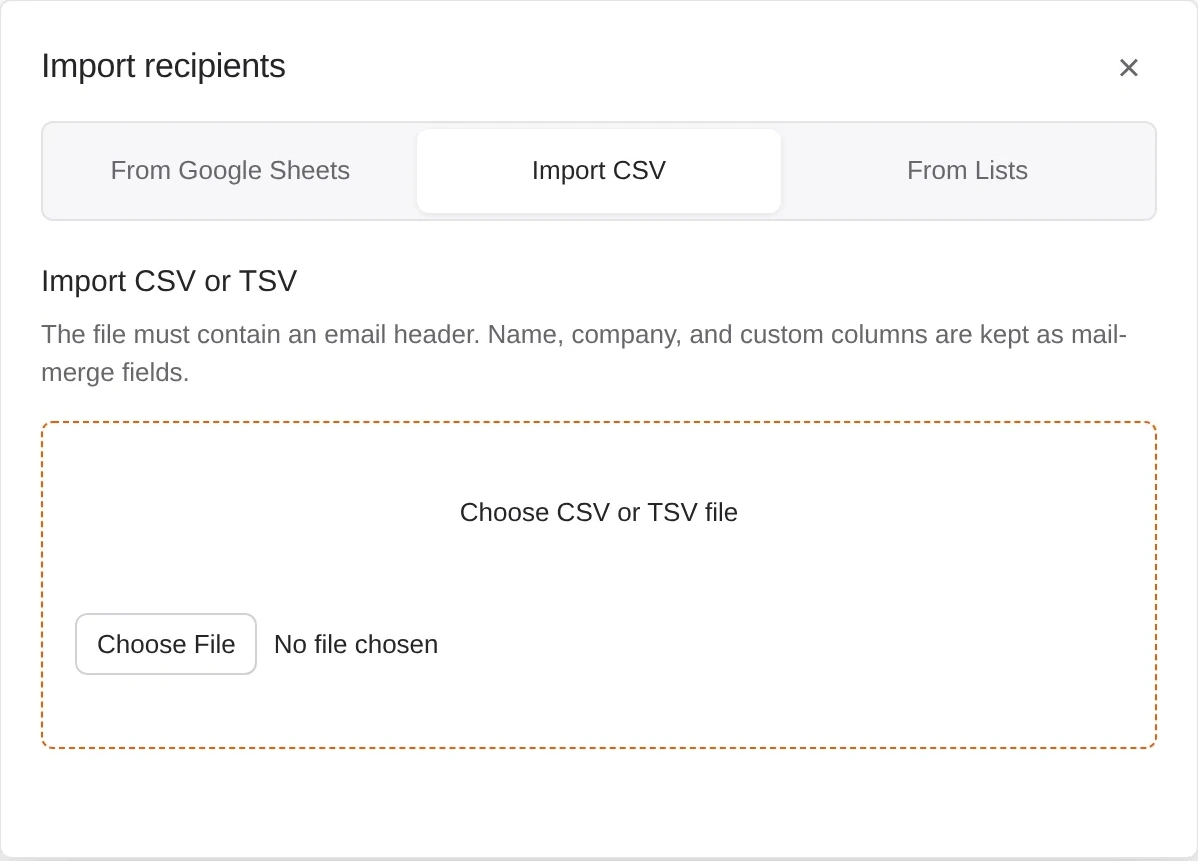
Import recipients dialog in the Elite extension with tabs for Google Sheets, CSV and saved lists, and a CSV or TSV file picker

02Google Sheets

Pick a sheet without leaving your inbox

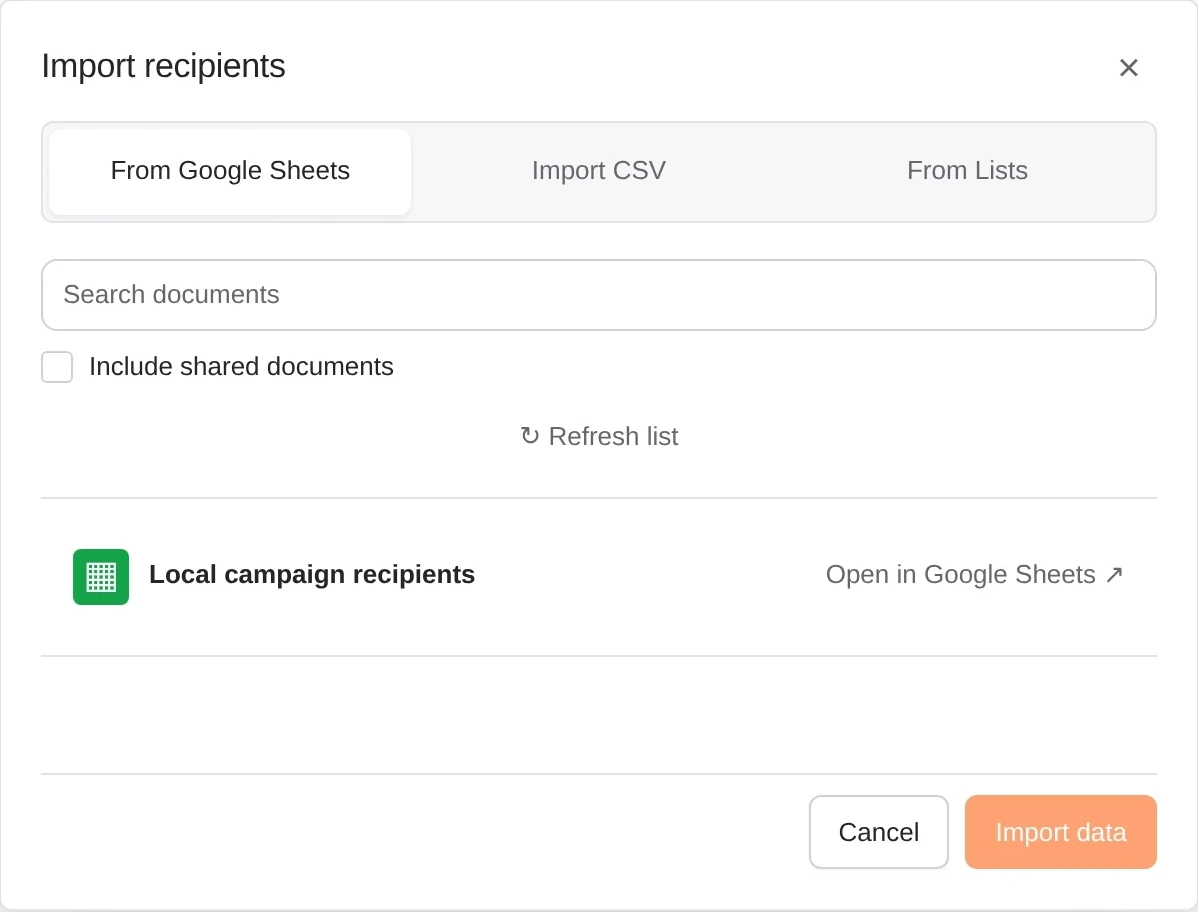
Choose a spreadsheet, select the range and review conflicts before the contacts are added

  • Select the sheet. Only the file you choose is shared with Elite.
  • Review conflicts. See which rows would change an existing contact.
  • Reuse the list. Save the audience for the next send.
Import recipients dialog in the Elite extension listing Google Sheets documents to import from

03In the message

Put the right detail in every message

Write fields in double braces in the subject and body. Add a fallback after a pipe for contacts with a missing value.

  • Fields in subject and body. {{first_name}}, {{company}} and your own columns.
  • A natural default. {{first_name|there}} reads well when the name is missing.
  • Works with templates. Saved templates can carry the same fields.

04Review

Review the campaign before the first send

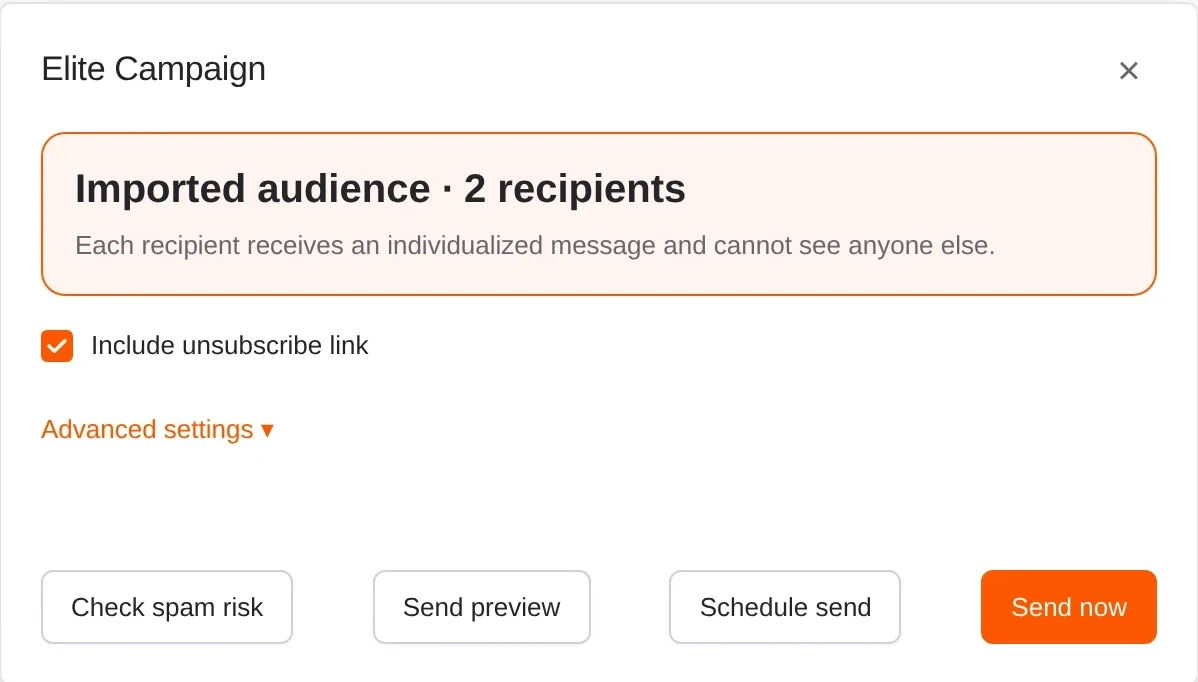
The review step shows the audience, the message and the schedule together. Variables are rendered separately for each recipient.

  • Read it as a recipient. Check the personalized message before launch.
  • Schedule the send. Send now or pick a time, in one batch or several.
  • Hand off to a campaign. The merged message is sent through your own mailbox.
Elite Campaign dialog showing the imported audience, the unsubscribe link option and buttons to check spam risk, send a preview, schedule or send now

Get started

Bring a list. Make the message personal.

Map your contact fields, write a natural fallback, and preview a few different recipients before you send

  1. Choose your contacts

    Upload a CSV or use a saved list

  2. Add contact fields

    Insert variables and choose fallback text for missing values

  3. Preview several recipients

    Check names, blank fields, and wording before launch

  4. Send the campaign

    Choose a schedule and review suppression and sender settings

Create a free account. Available on Pro.

Personalize your first campaignSet up a personalized campaign

Use cases

Make the details personal at every scale

A personal introduction for everyone on your list

01

First-name outreach

Use a friendly fallback such as “there” instead of exposing a blank token

02

Account-specific updates

Merge company, role, plan, renewal, or region fields into one reviewed message

03

Lists from another system

Bring a spreadsheet export into Elite Mail Works without rebuilding every contact by hand

What's included

  • CSV import
  • Custom fields
  • Fallbacks
  • Recipient previews
  • Separate delivery
  • Campaign handoff

Good to know

Clear about the limits

We would rather you trust Elite than be surprised by it. These are the boundaries worth knowing before you rely on it.

Security and privacy at Elite

  1. Mail merge improves personalization mechanics; it does not validate whether a claim is true or whether the recipient expected the message
  2. Attachments and tracked documents follow their own size, access, and provider rules even when the surrounding message is merged

Keep going

Works better together

Every Elite feature shares the same contacts, messages and history, so the next step is already in context

Campaigns

Send personalized campaigns from your own inbox

Explore

Email Templates

Save and share the messages your team uses most

Explore

CRM for Email

Keep contacts and conversations together

Explore

Questions

Mail Merge FAQ

Answers about setup, compatibility, privacy, and day-to-day use

Visit the help center

Which file format can I import?

CSV is the portable import format. Spreadsheet applications can export a sheet as CSV before upload.

What happens when a field is empty?

You choose a fallback or revise the audience before launch. Previewing multiple recipients is designed to expose missing-field behavior.

Can variables appear in the subject line?

Yes. Templates can carry a subject template as well as rich body content.

Does a merge create separate tracking?

Yes, when launched as an individualized campaign. Each provider message receives its own delivery and event attribution.

Get started

Make your next message personal

A personal introduction for everyone on your list

Personalize your first campaignCompare plansView all features
Elite Mail WorksElite Mail Works
Email TrackerWorkflowsSolutionsPricing
Log inStart free

Tracking

Elite Email TrackerFollow-up RemindersEmail Analytics

Outreach

CampaignsMail MergeEmail TemplatesVideo Messages

Requests & documents

Document RequestsVideo RequestsSignature RequestDocuments overviewDocument TrackingSecure Document SharingConfidential Watermark

Workspace

CRM for EmailTracker BlockingWorkflowsIntegrationsAI connections

Get Elite Mail Works

Chrome ExtensionEdge ExtensionFirefox ExtensionGmail™ Mobile Add-onOutlook Add-iniPhone & iPad AppAndroid App

Resources

BlogSign PDF OnlineSignature StudioEmail signature templatesGmail™ signature generatorOutlook signature generatorVideo RecorderEmail Tracking GuideWorkflow ExamplesTutorialsCustom EmailFAQs & Help CenterComparisons
View all features
Product
Elite Email TrackerFollow-up RemindersEmail AnalyticsCampaignsMail MergeEmail TemplatesVideo MessagesDocument RequestsVideo RequestsSignature RequestDocuments overviewDocument TrackingSecure Document SharingConfidential WatermarkCRM for EmailTracker BlockingWorkflowsIntegrationsAI connections
Download
Chrome ExtensionEdge ExtensionFirefox ExtensionGmail™ Mobile Add-onOutlook Add-iniPhone & iPad AppAndroid App
Resources
BlogSign PDF OnlineSignature StudioEmail signature templatesGmail™ signature generatorOutlook signature generatorVideo RecorderEmail Tracking GuideWorkflow ExamplesTutorialsCustom Email
WorkflowsSolutionsPricing
Log inStart free
Ask about Elite Mail Works on
Elite Mail WorksElite Mail Works
  • Download on the App Store
  • Get it on Google Play

Company

ContactAbout UsBrandingCareersPress

Features

Elite Email TrackerFollow-up RemindersEmail AnalyticsCampaignsMail MergeEmail TemplatesVideo MessagesDocument TrackingSecure Document SharingConfidential WatermarkSignature RequestCRM for EmailTracker BlockingDocument RequestsVideo Requests

Solutions

StartupsLawyers & AttorneysFreelancersHRTeachers & ProfessorsReal EstateMarketersSmall BusinessSales ProfessionalsAccountantsElite Mail Works for TeamsProposal Software

Download

Chrome ExtensionEdge ExtensionFirefox ExtensionGmail™ Mobile Add-onOutlook Add-iniPhone & iPad AppAndroid App

Resources

BlogSign PDF OnlineSignature StudioEmail signature templatesGmail™ signature generatorOutlook signature generatorVideo RecorderEmail Tracking GuideWorkflow ExamplesTutorialsCustom EmailWorkflowsDocuments overviewAI actionsIntegrationsEnterprisePricingFAQsComparisonsPrivacyTermsSecurity
  • Available in the Chrome Web Store
  • Add to Slack
  • Available on Microsoft Marketplace: Outlook add-in
  • Get it from Microsoft Edge
  • Get the Firefox add-on
  • Get it from Google Workspace Marketplace: Gmail add-on
  • Powered by AWS: system email delivery using Amazon SES
  • Protected by Cloudflare
  • Powered by Stripe: payment processing
  • elitemailsuite.com: green hosting through Cloudflare, checked by Green Web Foundation
  • Product HuntFind us onProduct Hunt

© 2026 Elite Mail Works. All rights reserved.

Gmail™, Google Workspace, Chrome, and Android are trademarks of Google LLC. Microsoft, Microsoft Edge, and Outlook are trademarks of the Microsoft group of companies. Yahoo and Yahoo Mail are trademarks of Yahoo Inc. Elite Mail Works is an independent product and is not affiliated with or endorsed by these companies.