Home/Features/Campaigns

Mass email campaigns from Gmail™ and OutlookPersonalized mass email campaigns

Send a separate message to each contact with mail merge and scheduling. Review your audience and suppression settings before launch.

Build your first campaignSee how it works
Create a free account. Available on Pro.See plans
Campaigns in the Elite Mail Works dashboard: each campaign with its recipients, open rate, replies, bounces and unsubscribes
  • A message for each person

    Send separate, personalized emails from your connected Gmail™ or Outlook account

  • Check before you send

    Preview recipients, review your message, and choose a schedule

  • Respect your audience

    Keep consent, suppression, and unsubscribe controls with your campaign

Works with Gmail™ OutlookCSVGoogle SheetsContact lists

Why it mattersHow it worksGet startedUse casesGood to knowQuestions

Why it matters

BCC reaches a crowd. A campaign reaches each person.

Pasting addresses into BCC gives you one message, no personalization and no idea who engaged. Elite sends a separate email to every contact from your own mailbox.

BCC and copy-paste

  • One message for everyoneNo names, no context, and it reads like a broadcast.
  • No record per recipientYou cannot tell who opened, who clicked or who bounced.
  • Opt-outs handled by handRemoving people who asked not to hear from you is a manual chore.

With Elite Mail Works

  • Individual deliveryEvery contact receives their own email, sent from your connected Gmail™ or Outlook account.
  • Recipient-level reportingReview delivery, opens and clicks person by person.
  • Suppression built inUnsubscribes and suppressed contacts are excluded before each send.

How it works

One campaign, many individual conversations

Build the audience, review the message, and follow each delivery as it goes out

01Campaign workspace

One campaign. Individual conversations.

Bring your audience, personalized content, and recipient-level delivery progress into one workspace

  • Four steps to launch. Setup, message, recipients and review.
  • Variables for personalization. Fields such as {{first_name}} are filled in for each recipient.
  • An optional follow-up. Add a second message for people who have not replied.
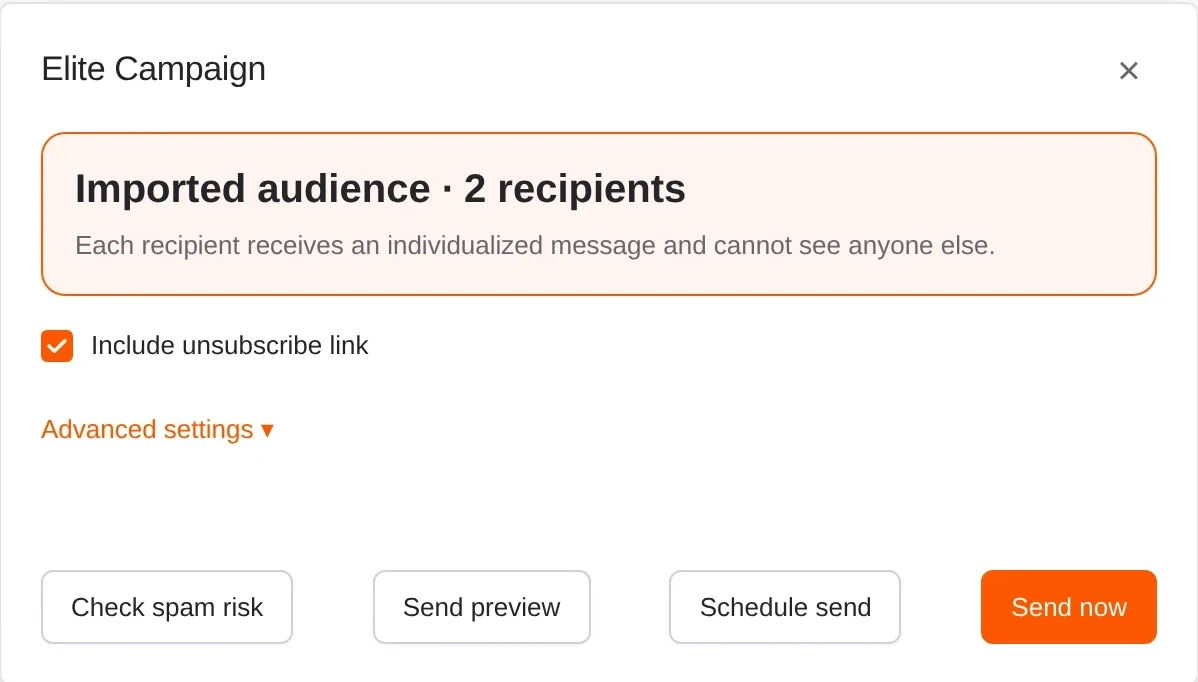
Elite Campaign review step in the extension with the imported audience, the unsubscribe link option and buttons to check spam risk, send a preview, schedule the send or send now

02Before you send

Check the message before it goes out

Preflight reviews the draft, the sender and the audience and flags problems before launch

  • Review before launch. Message, sender setup and audience are checked in one pass.
  • Approvals. Follow-ups that need a decision wait in an approval queue.
  • Opt-outs stay out. Unsubscribed and bounced contacts are not sent to again without renewed consent.
Preflight check for a campaign draft with the message, sending mailbox, recipients and the list of checks

03Delivery

Follow delivery as each message goes out

Each message is sent through your connected Gmail™ or Outlook account, one recipient at a time

  • Sent through your mailbox. Messages leave from your own address and appear in your sent mail.
  • Progress by recipient. Each person is sent, queued, replied, bounced or unsubscribed.
  • Provider limits apply. Daily sending limits are set by Gmail™ and Outlook.
  • Elite records that a message was sent through your mailbox. It does not confirm delivery to the inbox.
  • Gmail™ sequences do not stop automatically on replies or bounces
Campaign detail with totals for sent, opened, clicked and replied and the activity of each recipient

04Approvals

Decide which follow-ups go out

When a follow-up needs your sign-off, it waits in Approvals with the recipient and the message ready to review

  • Review each one. See who it is for and what it says before it sends.
  • Approve or skip. Send the ones that still make sense and drop the rest.
  • Carry on one-to-one. A reply moves the conversation back to your inbox.
Approvals queue listing follow-ups waiting for a decision, with recipient, campaign and scheduled time

Get started

Start with an audience you know

Choose a small contact list, connect your sender, and review the personalized message before scheduling a send

  1. Choose your audience

    Select a contact list and a connected Gmail™ or Outlook sender

  2. Personalize and preview

    Add contact fields and review sample messages, sender details, and the campaign footer

  3. Schedule the batch

    Choose when to send. Campaigns apply suppression checks and respect provider limits.

  4. Review progress

    Check each send and its available activity. Resolve failed sends or connection issues before continuing.

Create a free account. Available on Pro.

Build your first campaignPrepare your first campaign

Use cases

Reach a list. Start individual conversations.

Reach the right people. Keep each conversation personal.

01

Product or company announcements

Personalize a launch to customers while keeping each delivery separate and suppressing opted-out contacts

02

Recruiting and fundraising

Send a measured batch from the mailbox the audience already recognizes and keep the follow-up history by person

03

Segmented follow-up

Use a CRM list and variables to turn one approved message into individualized provider sends

What's included

  • Individual delivery
  • Contact lists
  • Variables
  • Scheduling
  • Suppressions
  • Unsubscribe
  • Bounce handling
  • Campaign reporting

Good to know

Clear about the limits

We would rather you trust Elite than be surprised by it. These are the boundaries worth knowing before you rely on it.

Security and privacy at Elite

  1. Automated campaigns require Gmail™ or Outlook. Yahoo supports tracked webmail sends, but not automated campaigns.
  2. Gmail™ sequences cannot detect replies or bounces and require acknowledgement that these will not stop later messages
  3. Inbox placement depends on sender reputation, authentication, list quality, and provider limits

Keep going

Works better together

Every Elite feature shares the same contacts, messages and history, so the next step is already in context

Mail Merge

Turn contact data into personal email

Explore

Email Templates

Save and share the messages your team uses most

Explore

Email Analytics

See your email activity in one clear dashboard

Explore

Questions

Campaigns FAQ

Answers about setup, compatibility, privacy, and day-to-day use

Visit the help center

Is this the same as putting everyone in BCC?

No. Each contact receives a separate personalized message with its own send and tracking record.

How are unsubscribes handled?

Commercial campaigns can include an unsubscribe path and sender footer. Opt-outs and other suppressions are checked before future sends.

Can I schedule a campaign?

Yes. Queue a campaign for batch delivery and review any failed sends or connection issues in its status.

Can I send from Yahoo?

Not for automated campaigns. Connect Gmail™ or Outlook for that workflow; Yahoo supports tracked sends from webmail.

Get started

Start a campaign that feels like a conversation

Reach the right people. Keep each conversation personal.

Build your first campaignCompare plansView all features
Elite Mail WorksElite Mail Works
Email TrackerWorkflowsSolutionsPricing
Log inStart free

Tracking

Elite Email TrackerFollow-up RemindersEmail Analytics

Outreach

CampaignsMail MergeEmail TemplatesVideo Messages

Requests & documents

Document RequestsVideo RequestsSignature RequestDocuments overviewDocument TrackingSecure Document SharingConfidential Watermark

Workspace

CRM for EmailTracker BlockingWorkflowsIntegrationsAI connections

Get Elite Mail Works

Chrome ExtensionEdge ExtensionFirefox ExtensionGmail™ Mobile Add-onOutlook Add-iniPhone & iPad AppAndroid App

Resources

BlogSign PDF OnlineSignature StudioEmail signature templatesGmail™ signature generatorOutlook signature generatorVideo RecorderEmail Tracking GuideWorkflow ExamplesTutorialsCustom EmailFAQs & Help CenterComparisons
View all features
Product
Elite Email TrackerFollow-up RemindersEmail AnalyticsCampaignsMail MergeEmail TemplatesVideo MessagesDocument RequestsVideo RequestsSignature RequestDocuments overviewDocument TrackingSecure Document SharingConfidential WatermarkCRM for EmailTracker BlockingWorkflowsIntegrationsAI connections
Download
Chrome ExtensionEdge ExtensionFirefox ExtensionGmail™ Mobile Add-onOutlook Add-iniPhone & iPad AppAndroid App
Resources
BlogSign PDF OnlineSignature StudioEmail signature templatesGmail™ signature generatorOutlook signature generatorVideo RecorderEmail Tracking GuideWorkflow ExamplesTutorialsCustom Email
WorkflowsSolutionsPricing
Log inStart free
Ask about Elite Mail Works on
Elite Mail WorksElite Mail Works
  • Download on the App Store
  • Get it on Google Play

Company

ContactAbout UsBrandingCareersPress

Features

Elite Email TrackerFollow-up RemindersEmail AnalyticsCampaignsMail MergeEmail TemplatesVideo MessagesDocument TrackingSecure Document SharingConfidential WatermarkSignature RequestCRM for EmailTracker BlockingDocument RequestsVideo Requests

Solutions

StartupsLawyers & AttorneysFreelancersHRTeachers & ProfessorsReal EstateMarketersSmall BusinessSales ProfessionalsAccountantsElite Mail Works for TeamsProposal Software

Download

Chrome ExtensionEdge ExtensionFirefox ExtensionGmail™ Mobile Add-onOutlook Add-iniPhone & iPad AppAndroid App

Resources

BlogSign PDF OnlineSignature StudioEmail signature templatesGmail™ signature generatorOutlook signature generatorVideo RecorderEmail Tracking GuideWorkflow ExamplesTutorialsCustom EmailWorkflowsDocuments overviewAI actionsIntegrationsEnterprisePricingFAQsComparisonsPrivacyTermsSecurity
  • Available in the Chrome Web Store
  • Add to Slack
  • Available on Microsoft Marketplace: Outlook add-in
  • Get it from Microsoft Edge
  • Get the Firefox add-on
  • Get it from Google Workspace Marketplace: Gmail add-on
  • Powered by AWS: system email delivery using Amazon SES
  • Protected by Cloudflare
  • Powered by Stripe: payment processing
  • elitemailsuite.com: green hosting through Cloudflare, checked by Green Web Foundation
  • Product HuntFind us onProduct Hunt

© 2026 Elite Mail Works. All rights reserved.

Gmail™, Google Workspace, Chrome, and Android are trademarks of Google LLC. Microsoft, Microsoft Edge, and Outlook are trademarks of the Microsoft group of companies. Yahoo and Yahoo Mail are trademarks of Yahoo Inc. Elite Mail Works is an independent product and is not affiliated with or endorsed by these companies.