Home/Features/Elite Email Tracker

Elite Email TrackerEmail tracking for Gmail™, Outlook and Yahoo Mail

See when a tracked email is opened and which link is clicked. On Pro, each signal is labelled as a person, a privacy service or a security scanner, so you follow up on real interest.

Start tracking freeSee how it works
Free plan. No credit card needed.
Email tracking in the Elite Mail Works dashboard: engagement over time, an engagement funnel of 108 tracked deliveries, an activity calendar, the signal mix and the list of tracked messages
  • See the activity

    Review recorded opens, link clicks, and return visits before you follow up

  • Understand the signal

    Keep likely-human activity separate from privacy services and automated requests

  • Keep your familiar inbox

    Track messages where you send them. Gmail™ message history stays in your browser.

Works with Gmail™ Outlook Yahoo Mail Chrome Edge Firefox iOS Android

Why it mattersHow it worksFree and ProGet startedUse casesGood to knowQuestions

Why it matters

A read receipt asks permission. Email tracking shows you the whole story.

Built-in read receipts depend on the recipient agreeing to send one, and they say nothing about links, return visits or automated traffic. Elite records what happened and tells you how much weight to give it.

Built-in read receipts

  • The recipient decidesA receipt arrives only if the other person chooses to send it, and many accounts cannot request one at all.
  • One moment, no historyYou learn about a single open. Later visits and link clicks never reach you.
  • Every request looks the samePrivacy proxies and security scanners are indistinguishable from a person reading.

With Elite Mail Works

  • Recorded automaticallyOpens and link clicks are recorded for the messages you choose to track, with no prompt for the recipient.
  • A timeline for each messageSee the first open, every return visit and each link click in order, beside the message you sent.
  • Signals with labelsLikely-human activity is kept apart from privacy services, security scanners, AI agents and your own views.

How it works

Everything that happens after you press Send

The same activity, from the status beside a sent message to the full report behind it

01In your inbox

See activity beside the message you sent

The Elite extension lists every tracked message with its latest signal, so you can check on a proposal without leaving Gmail™, Outlook or Yahoo Mail

  • A status for each message. Likely open, likely click, hot interest and follow-up due are marked on the row.
  • Expand a row for the detail. Browser, operating system, device, approximate location and network for each open or click.
  • Alerts you choose. Be notified about an open, a click, repeat opens, or a message that is still unopened after a day.
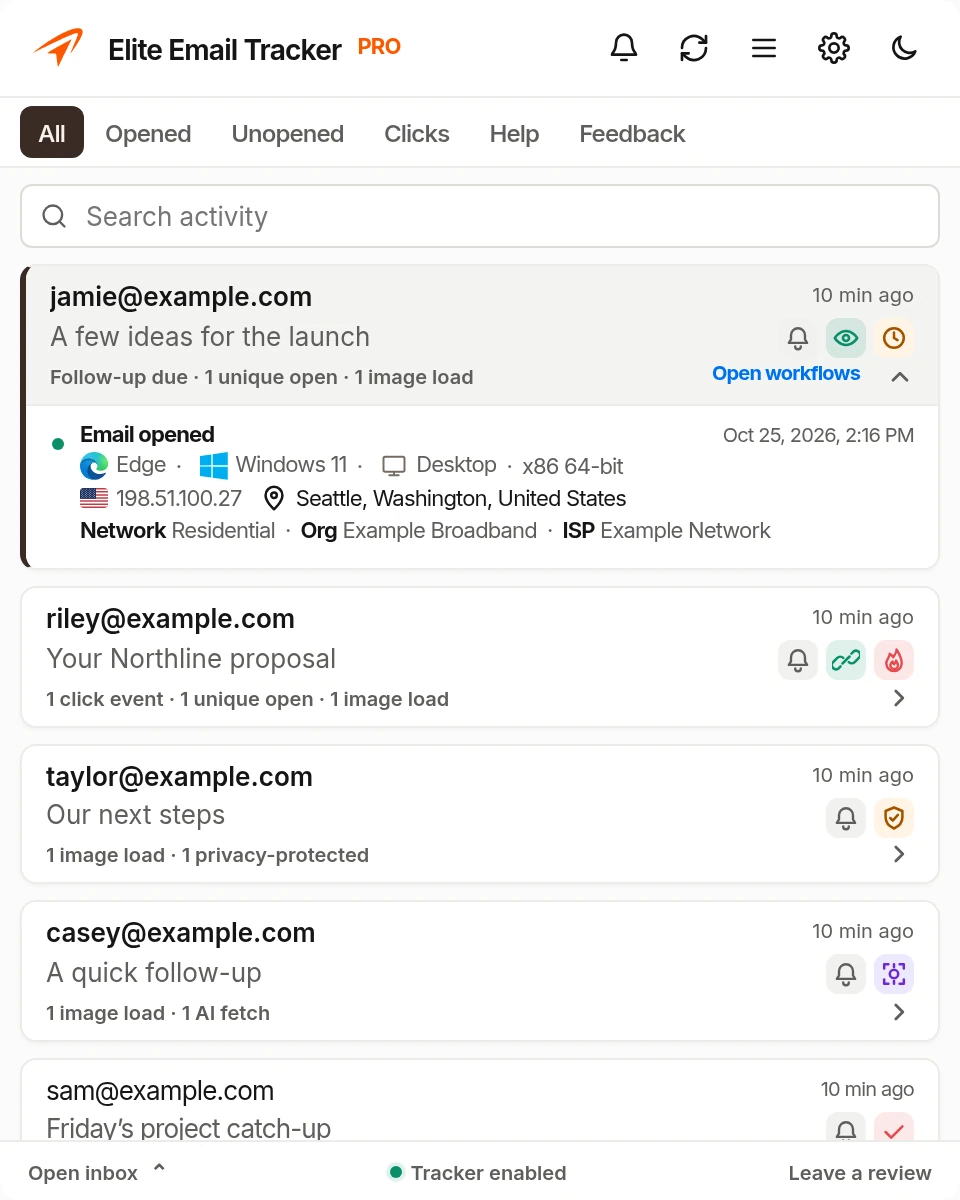
Elite browser extension listing tracked messages, with one open expanded to show browser, operating system, device, location and network

02Message report

One report for every tracked message

Open any tracked message to see who it went to, whether it was sent, and each open and click in order, newest first

  • Every signal in order. Each open and link click with its time, so a return visit days later is easy to spot.
  • Where the request came from. Browser, operating system, device type, city and country, IP address, internet provider and time zone, on paid plans.
  • A record you can keep. Download a delivery certificate for the message when you need to show what was sent and when.
Email activity report for one message: recipients, send status, three opens, three clicks and a timeline of each signal with browser, device, location and network

03Link clicks

Know which link earned the visit

A click is a stronger signal than an open. Link clicks are listed on their own, with the destination that was visited and the message it came from.

  • The destination, not just a count. See whether the pricing page, the case study or the booking link was opened.
  • Who clicked and from where. Recipient, device, approximate location and network for each click.
  • Opens and clicks kept apart. Each has its own report, so an image request is never mistaken for a visit.
Link clicks report listing each click with the recipient, message subject, destination, device, location and time

04Signal quality

Know how much weight each signal deserves

Not every recorded request is a person reading. Elite classifies each one and keeps automated activity out of your engagement counts.

  • Email engagement. Activity consistent with a person opening the message or following a link.
  • Privacy protected. Apple Mail Privacy Protection and mail image proxies, labelled as such.
  • Security scanners and AI agents. Automated link checks and AI assistants fetching the message are identified separately.
  • Your own views. Opens from the sender are suppressed.

How Elite classifies signals

Signal mix chart: 95 signals split into email engagement, privacy protected, security scanner, AI activity and suppressed self views

*Open tracking records image requests, not proof that a person read or understood a message. Privacy services and security scanners remain separate from email engagement.

Plans

Free to track. Pro for the detail.

Tracking is free and unlimited. Pro adds the context that tells you what each signal is worth.

FreeIncluded at no cost

  • Unlimited tracked emails
  • Open and click status for each message
  • Recent activity
  • Basic open alerts
  • A short Elite signature line on tracked emails

ProEverything in Free, plus

  • Labels for people, privacy services and security scanners
  • Location, mail client and device for each signal
  • Complete tracking history
  • Click and PDF-view alerts on desktop, email and push
  • No Elite signature line

Compare plans

Get started

Start with one email that matters

Connect your inbox, send a tracked message, and return to its activity before you follow up

  1. Send a tracked message

    Write in supported webmail and leave tracking enabled for the message

  2. Review activity

    See opens and clicks with labels for likely human, privacy, scanner, sender, and unknown activity

  3. Check the timeline

    Open the activity history for timing and repeat visits, even if you missed a notification

  4. Plan your follow-up

    Use the available activity alongside what you know about the conversation

Free plan. No credit card needed.

Start tracking freeSend your first tracked email

Use cases

For the messages you want to follow through on

Follow up on the conversation, with the facts in front of you

01

Important one-to-one email

Review activity on a proposal, introduction, or client update before choosing your next step

02

Messages with several recipients

Review activity for the conversation when several people are copied. For recipient-level history, send individual messages or a personalized campaign.

03

Cross-provider conversations

Send from Gmail™, Outlook, or Yahoo. Recipients keep their usual email app; their image and privacy settings can affect which activity is recorded.

What's included

  • Open history
  • Link clicks
  • Repeat engagement
  • Likely-human classification
  • Privacy/scanner context
  • Full event timeline

Good to know

What the data can and cannot tell you

We would rather you trust the numbers than be impressed by them. These are the limits that matter when you read your activity.

Security and privacy at Elite

  1. Blocked images can leave no open signal. Privacy services and scanners can create requests without someone reading the message.
  2. Gmail™ message history stays in your browser; it is not synchronized to cloud reports

Keep going

Works better together

Every Elite feature shares the same contacts, messages and history, so the next step is already in context

Follow-up Reminders

Know when it is time to follow up

Explore

Email Analytics

See your email activity in one clear dashboard

Explore

Document Tracking

See document views and activity on each page

Explore

Questions

Elite Email Tracker FAQ

Answers about setup, compatibility, privacy, and day-to-day use

Visit the help center

Can Elite distinguish Apple Mail privacy fetches and security scanners from human opens?

Elite classifies recorded activity as likely human, privacy protected, machine, or unknown. Recognized Apple Mail Privacy Protection and Gmail image-proxy activity receive privacy labels; detected scanners and likely sender activity are labeled or suppressed. These classifications are estimates, not proof of a human read. Privacy services can preload images, blocked images can hide opens, and unrecognized automation can remain uncertain. Review the event details and replies before following up. Read the bot filtering and signal-quality documentation. Understand opens, clicks, and their limits.

How do I start tracking emails?

Choose the Elite integration for your supported email app, complete its setup, and send a message with tracking enabled. Review recorded opens and link clicks in the message activity before following up. An open is an activity signal; blocked images can hide it, and privacy services or scanners can generate it. Read the email tracking guide. Choose your email integration.

What do one and two checkmarks mean?

One check marks a registered tracked send. Two checks indicate qualifying activity; open the details to see the event and its classification.

Can I see exactly where a recipient opened an email?

Location is approximate when available. VPNs, mobile networks, and email privacy services may hide or change the apparent location.

Does opening my own sent message trigger a notification?

Elite labels or suppresses likely sender activity. When it cannot determine the source, the activity remains marked as uncertain.

Are link clicks tracked separately from opens?

Yes. Tracked links produce separate click events. Security scanners can also follow links, so clicks receive activity labels too.

Get started

Send your next email with better context

Follow up on the conversation, with the facts in front of you

Start tracking freeCompare plansView all features
Elite Mail WorksElite Mail Works
Email TrackerWorkflowsSolutionsPricing
Log inStart free

Tracking

Elite Email TrackerFollow-up RemindersEmail Analytics

Outreach

CampaignsMail MergeEmail TemplatesVideo Messages

Requests & documents

Document RequestsVideo RequestsSignature RequestDocuments overviewDocument TrackingSecure Document SharingConfidential Watermark

Workspace

CRM for EmailTracker BlockingWorkflowsIntegrationsAI connections

Get Elite Mail Works

Chrome ExtensionEdge ExtensionFirefox ExtensionGmail™ Mobile Add-onOutlook Add-iniPhone & iPad AppAndroid App

Resources

BlogSign PDF OnlineSignature StudioEmail signature templatesGmail™ signature generatorOutlook signature generatorVideo RecorderEmail Tracking GuideWorkflow ExamplesTutorialsCustom EmailFAQs & Help CenterComparisons
View all features
Product
Elite Email TrackerFollow-up RemindersEmail AnalyticsCampaignsMail MergeEmail TemplatesVideo MessagesDocument RequestsVideo RequestsSignature RequestDocuments overviewDocument TrackingSecure Document SharingConfidential WatermarkCRM for EmailTracker BlockingWorkflowsIntegrationsAI connections
Download
Chrome ExtensionEdge ExtensionFirefox ExtensionGmail™ Mobile Add-onOutlook Add-iniPhone & iPad AppAndroid App
Resources
BlogSign PDF OnlineSignature StudioEmail signature templatesGmail™ signature generatorOutlook signature generatorVideo RecorderEmail Tracking GuideWorkflow ExamplesTutorialsCustom Email
WorkflowsSolutionsPricing
Log inStart free
Ask about Elite Mail Works on
Elite Mail WorksElite Mail Works
  • Download on the App Store
  • Get it on Google Play

Company

ContactAbout UsBrandingCareersPress

Features

Elite Email TrackerFollow-up RemindersEmail AnalyticsCampaignsMail MergeEmail TemplatesVideo MessagesDocument TrackingSecure Document SharingConfidential WatermarkSignature RequestCRM for EmailTracker BlockingDocument RequestsVideo Requests

Solutions

StartupsLawyers & AttorneysFreelancersHRTeachers & ProfessorsReal EstateMarketersSmall BusinessSales ProfessionalsAccountantsElite Mail Works for TeamsProposal Software

Download

Chrome ExtensionEdge ExtensionFirefox ExtensionGmail™ Mobile Add-onOutlook Add-iniPhone & iPad AppAndroid App

Resources

BlogSign PDF OnlineSignature StudioEmail signature templatesGmail™ signature generatorOutlook signature generatorVideo RecorderEmail Tracking GuideWorkflow ExamplesTutorialsCustom EmailWorkflowsDocuments overviewAI actionsIntegrationsEnterprisePricingFAQsComparisonsPrivacyTermsSecurity
  • Available in the Chrome Web Store
  • Add to Slack
  • Available on Microsoft Marketplace: Outlook add-in
  • Get it from Microsoft Edge
  • Get the Firefox add-on
  • Get it from Google Workspace Marketplace: Gmail add-on
  • Powered by AWS: system email delivery using Amazon SES
  • Protected by Cloudflare
  • Powered by Stripe: payment processing
  • elitemailsuite.com: green hosting through Cloudflare, checked by Green Web Foundation
  • Product HuntFind us onProduct Hunt

© 2026 Elite Mail Works. All rights reserved.

Gmail™, Google Workspace, Chrome, and Android are trademarks of Google LLC. Microsoft, Microsoft Edge, and Outlook are trademarks of the Microsoft group of companies. Yahoo and Yahoo Mail are trademarks of Yahoo Inc. Elite Mail Works is an independent product and is not affiliated with or endorsed by these companies.