Home/Features/Secure Document Sharing

Secure document sharing with access controlsDocument sharing with access controls

Share a link with expiration and download settings. Revoke future access when you need to.

Share a controlled documentSee how it works
Create a free account. Available on Pro.See plans
A shared document in the Elite Mail Works dashboard with the links it was shared on and each viewer's activity
  • Link controls

    Choose expiration, maximum viewer sessions, and whether downloads are allowed

  • Expiration and revocation

    Close the link without recalling the email

  • Large-file friendly

    Share a controlled viewer rather than an oversized attachment

Works withPDFPresentationsSpreadsheetsAny modern browser Gmail™ Outlook Yahoo Mail

Why it mattersHow it worksGet startedUse casesGood to knowQuestions

Why it matters

You cannot take back an attachment. You can take back a link.

An attached file is a permanent copy the moment it is delivered. A controlled link lets you decide how long it works, whether it can be downloaded and when to switch it off.

Email attachments

  • Permanent by defaultOld versions live in inboxes long after they should.
  • One file for everyoneThe same copy goes to every recipient, with no way to tell them apart.
  • Size limitsLarge proposals bounce or get stripped by mail servers.

With Elite Mail Works

  • Expiration and view limitsSet how long a link works and how many times it can be opened.
  • A link per recipientEach person has their own link with its own settings.
  • Revoke when plans changeTurn off a link without replacing the source document.

How it works

Share the document. Keep the controls.

Every link carries its own rules, and you can change them after sending

01Link settings

A shared document with clear boundaries

Three settings decide what a link allows: when it expires, whether the file can be downloaded, and whether pages carry a confidential watermark

  • Access expiration date. Pick the date and time the link stops working.
  • Display download button. Leave it off to keep the document view-only.
  • Add confidential watermark. Mark every page of the shared copy.
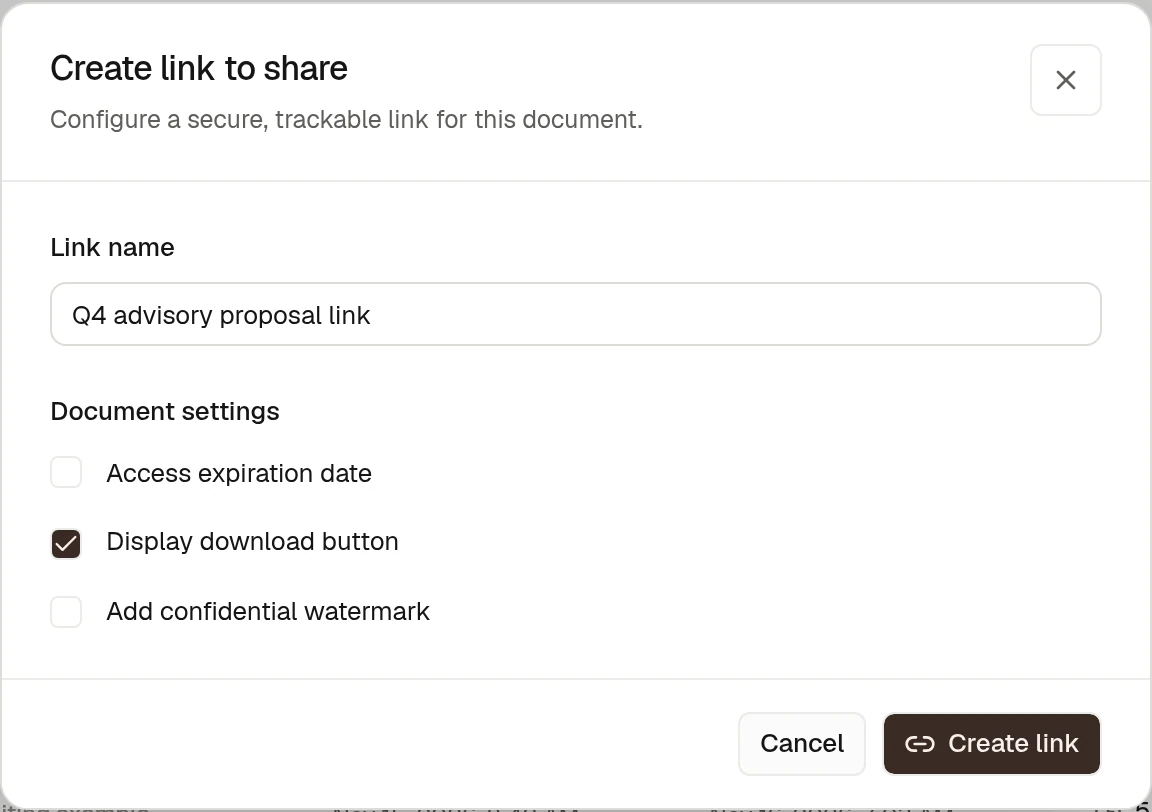
Create link dialog with document settings for an access expiration date, the download button and a confidential watermark

02Recipient links

Prepare access for the right recipient

Create separate links with their own settings instead of distributing one permanent attachment

  • Separate links. Create one link per recipient or a general link.
  • Individual settings. Each link has its own expiry, download and watermark choices.
  • Clear history. Views are recorded against the link they came from.
Document detail listing the links a file was shared on and the viewers of each

03The viewing page

What your recipient opens

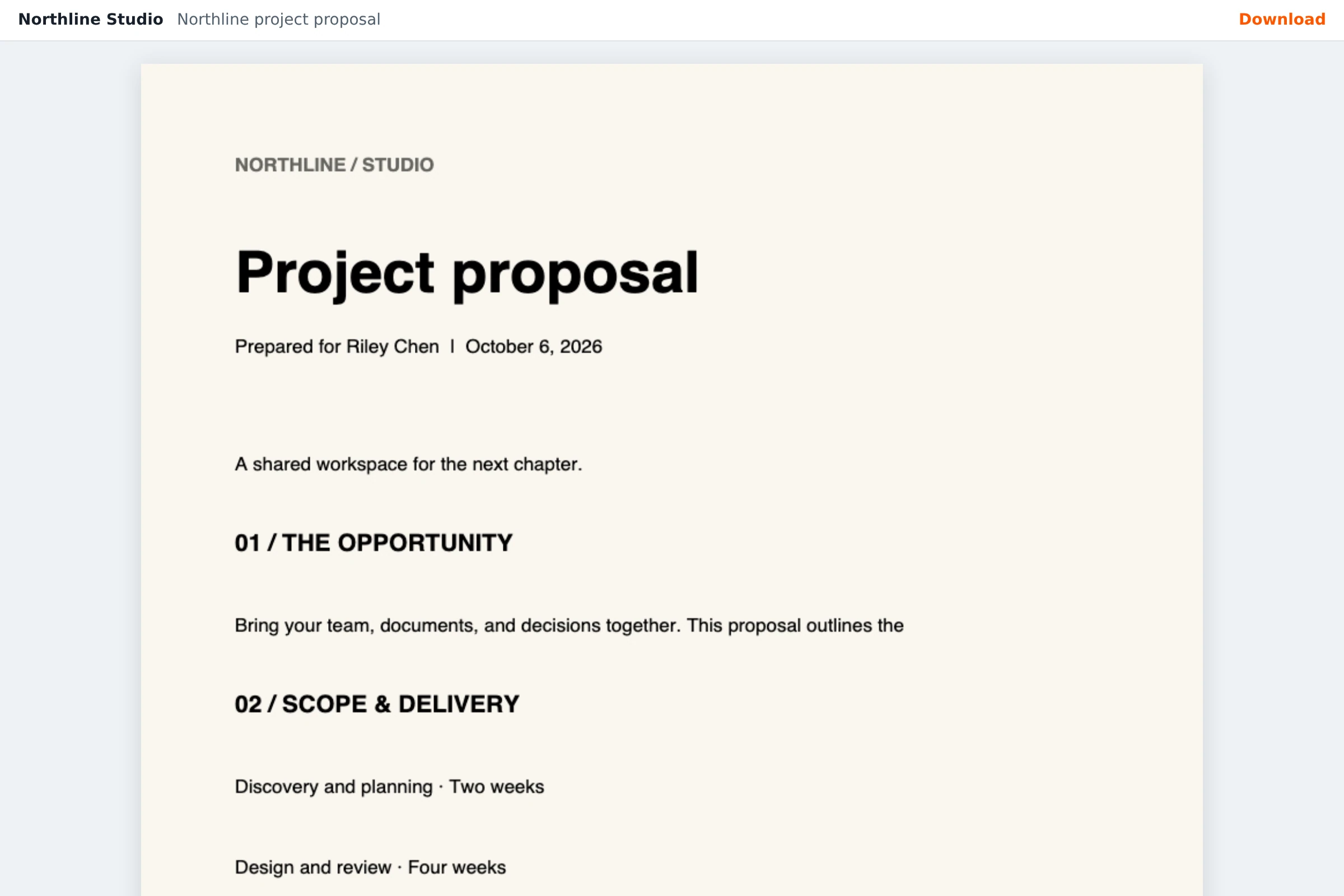
The link opens the document in the browser. No account or download is needed to read it.

  • Opens in any browser. PDF, Word, PowerPoint, spreadsheets and images are shown in the viewer.
  • Download only if you allow it. The button appears when the link permits it.
  • Same source file. Every link points to the document in your library.
Shared PDF as a recipient sees it in the browser viewer

04Unshare

Keep control after sending

Revoke a link when access is no longer needed and keep the rest of your sharing workflow intact

  • Turn a link off. An unshared link shows the recipient that it is expired or unavailable.
  • Leave the others alone. Other links to the same document keep working.
  • Restore it later. Share the link again when access is needed.
  • A link cannot recall a copy that was already downloaded
Recipient page stating that the document is unavailable because the link is expired or no longer shared

Get started

Make your next handoff a controlled link

Upload the file, prepare access for one recipient, and decide how long the link should stay available

  1. Upload once

    Keep the source file in your document workspace

  2. Set access

    Choose expiration, download permissions, view limits, and any access checks

  3. Send the link

    Insert it into an email or copy it to share

  4. Update access

    Revoke the link, or restore access when your link settings allow it

Create a free account. Available on Pro.

Share a controlled documentPrepare your first document link

Use cases

From proposal to handoff, keep access clear

A professional handoff, with control beyond the send button

01

Large proposals

Avoid mailbox attachment limits while preserving a polished browser viewer

02

Time-limited client files

Set an expiration instead of relying on the recipient to delete an old attachment

03

Correcting access after send

Revoke a link when a recipient changes, a deal closes, or the wrong audience received it

What's included

  • Expiration
  • View limits
  • Download controls
  • Revocation
  • Viewer identity
  • Branded viewing

Good to know

Clear about the limits

We would rather you trust Elite than be surprised by it. These are the boundaries worth knowing before you rely on it.

Security and privacy at Elite

  1. Access controls apply to the shared link. They cannot prevent screenshots or recall copies already downloaded.
  2. View limits count recorded viewer access, with repeated technical requests handled together

Keep going

Works better together

Every Elite feature shares the same contacts, messages and history, so the next step is already in context

Confidential Watermark

Add a viewer-specific watermark to every page

Explore

Document Tracking

See document views and activity on each page

Explore

Signature Request

Send, track, and complete signature requests

Explore

Questions

Secure Document Sharing FAQ

Answers about setup, compatibility, privacy, and day-to-day use

Visit the help center

Should I send a document link or an email attachment?

A sharing link lets you manage expiration, download permissions, view limits, and revocation in Elite's hosted viewer. A normal attachment gives the recipient a separate copy that those link controls cannot recall. If you also need page activity and viewing reports, use document tracking on the sharing link. Explore document viewing reports. Request files from someone else.

Is the link guessable?

Links use random tokens. Anyone with the link may be able to open it unless you add identity or access-code controls.

Can I disable downloads?

Yes. Turn off downloads in the link settings. Recipients can still view the document in the browser.

What happens after expiration or revocation?

The link stops serving the document. You can create a new link without uploading the file again.

Can I set a view limit?

Yes. Links can carry a maximum-view policy and stop serving after the limit is reached.

Get started

Share your next document on your terms

A professional handoff, with control beyond the send button

Share a controlled documentCompare plansView all features
Elite Mail WorksElite Mail Works
Email TrackerWorkflowsSolutionsPricing
Log inStart free

Tracking

Elite Email TrackerFollow-up RemindersEmail Analytics

Outreach

CampaignsMail MergeEmail TemplatesVideo Messages

Requests & documents

Document RequestsVideo RequestsSignature RequestDocuments overviewDocument TrackingSecure Document SharingConfidential Watermark

Workspace

CRM for EmailTracker BlockingWorkflowsIntegrationsAI connections

Get Elite Mail Works

Chrome ExtensionEdge ExtensionFirefox ExtensionGmail™ Mobile Add-onOutlook Add-iniPhone & iPad AppAndroid App

Resources

BlogSign PDF OnlineSignature StudioEmail signature templatesGmail™ signature generatorOutlook signature generatorVideo RecorderEmail Tracking GuideWorkflow ExamplesTutorialsCustom EmailFAQs & Help CenterComparisons
View all features
Product
Elite Email TrackerFollow-up RemindersEmail AnalyticsCampaignsMail MergeEmail TemplatesVideo MessagesDocument RequestsVideo RequestsSignature RequestDocuments overviewDocument TrackingSecure Document SharingConfidential WatermarkCRM for EmailTracker BlockingWorkflowsIntegrationsAI connections
Download
Chrome ExtensionEdge ExtensionFirefox ExtensionGmail™ Mobile Add-onOutlook Add-iniPhone & iPad AppAndroid App
Resources
BlogSign PDF OnlineSignature StudioEmail signature templatesGmail™ signature generatorOutlook signature generatorVideo RecorderEmail Tracking GuideWorkflow ExamplesTutorialsCustom Email
WorkflowsSolutionsPricing
Log inStart free
Ask about Elite Mail Works on
Elite Mail WorksElite Mail Works
  • Download on the App Store
  • Get it on Google Play

Company

ContactAbout UsBrandingCareersPress

Features

Elite Email TrackerFollow-up RemindersEmail AnalyticsCampaignsMail MergeEmail TemplatesVideo MessagesDocument TrackingSecure Document SharingConfidential WatermarkSignature RequestCRM for EmailTracker BlockingDocument RequestsVideo Requests

Solutions

StartupsLawyers & AttorneysFreelancersHRTeachers & ProfessorsReal EstateMarketersSmall BusinessSales ProfessionalsAccountantsElite Mail Works for TeamsProposal Software

Download

Chrome ExtensionEdge ExtensionFirefox ExtensionGmail™ Mobile Add-onOutlook Add-iniPhone & iPad AppAndroid App

Resources

BlogSign PDF OnlineSignature StudioEmail signature templatesGmail™ signature generatorOutlook signature generatorVideo RecorderEmail Tracking GuideWorkflow ExamplesTutorialsCustom EmailWorkflowsDocuments overviewAI actionsIntegrationsEnterprisePricingFAQsComparisonsPrivacyTermsSecurity
  • Available in the Chrome Web Store
  • Add to Slack
  • Available on Microsoft Marketplace: Outlook add-in
  • Get it from Microsoft Edge
  • Get the Firefox add-on
  • Get it from Google Workspace Marketplace: Gmail add-on
  • Powered by AWS: system email delivery using Amazon SES
  • Protected by Cloudflare
  • Powered by Stripe: payment processing
  • elitemailsuite.com: green hosting through Cloudflare, checked by Green Web Foundation
  • Product HuntFind us onProduct Hunt

© 2026 Elite Mail Works. All rights reserved.

Gmail™, Google Workspace, Chrome, and Android are trademarks of Google LLC. Microsoft, Microsoft Edge, and Outlook are trademarks of the Microsoft group of companies. Yahoo and Yahoo Mail are trademarks of Yahoo Inc. Elite Mail Works is an independent product and is not affiliated with or endorsed by these companies.