Home/Solutions/Sales Professionals

Email tracking for sales teamsEmail tracking for sales follow-ups

Review recorded email and proposal activity before reaching out. Keep contact notes and reminders with your sales work.

Build your first workflowSee how it works
Create a free account. Available on Pro.See plans
Email tracking in the Elite Mail Works dashboard: tracked messages, engagement over time and the signal mix
  • Outbound prospecting

    Send individualized mail from a known provider identity with suppression and provider limits respected

  • Proposal follow-up

    See page coverage, dwell, download, and signature progress before the next call

  • Pipeline revival

    Surface an older conversation when qualified activity returns instead of relying on memory

Works with Gmail™ Outlook Yahoo MailProposalsSignaturesContacts

Why it mattersHow it worksGet startedUse casesGood to knowQuestions

Why it matters

The deal does not go cold. Your view of it does.

Between the proposal and the signature there is a long stretch where you cannot see what is happening. Elite fills it in, so the next email is about what the buyer is actually looking at.

Selling blind

  • “Just checking in”Follow-ups with nothing new to say, sent on a guess.
  • One contact, one threadYou do not know the proposal reached finance or legal.
  • Reminders in your headGood conversations slip when the week gets busy.

With Elite Mail Works

  • Follow-ups with a reasonKnow which pages and links held attention before you write.
  • Every stakeholder in viewSeparate links show who in the account has engaged.
  • A queue for the next stepQuiet threads come back when they need you.

How it works

From first email to signed proposal

01Account view

Prepare the next account conversation

Connect stakeholder activity, proposal engagement, and follow-up reminders before your next email

  • Activity across the account. Email opens, link clicks and proposal views together.
  • Ready before the call. See what changed since you last spoke.
Latest activity feed listing email opens, link clicks and document views with the recipient, signal type and time

02Proposal engagement

Understand who is engaging with the proposal

Review separate recipient links and page-level attention across the account

  • A link per stakeholder. Know who read what.
  • Page-level attention. Pricing, scope and terms each tell a different story.
  • Finance spent the longest on pricing. Lead with that in your next email.
Document report with a viewer expanded to show time spent on each page, coverage and download status

03Follow-up

Put the next follow-up in motion

Use Outlook reply-aware reminders and recorded engagement to find the conversations that need a next step

  • No-reply reminders. Choose the wait and the action.
  • Reply-aware on Outlook. Reminders stop when an answer arrives.
Priority inbox ranking conversations by stage with their opens, clicks, replies and last activity

04Contacts

Keep every stakeholder in context

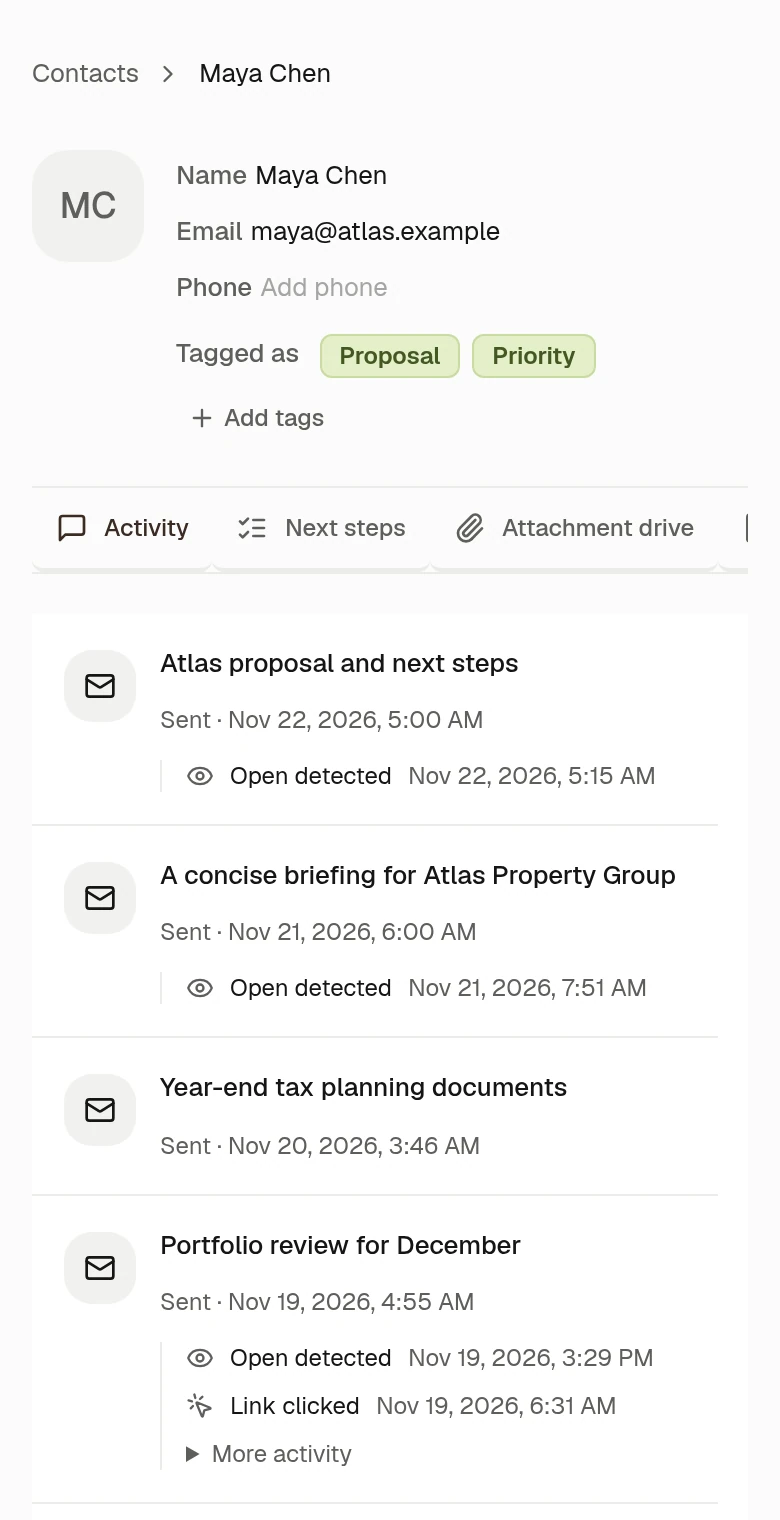
Organize company contacts, notes, and shared files so each follow-up starts with the relationship

  • Notes and shared files. Everything about the relationship in one record.
  • Lists for outreach. Group prospects and send individually.
  • Engagement is context for a better follow-up. It is not purchase intent.
Contact record with tags, tabs for activity, next steps, attachment drive, tracked PDFs and signed PDFs, and a timeline of tracked emails

Get started

Choose one conversation you don’t want to lose

Choose a waiting period and a next action: a reminder, a provider draft, or an authorized automatic follow-up. Set stop rules before turning it on.

  1. Connect your inbox

    Add Gmail™, Outlook or Yahoo Mail and keep sending from the address your prospects know

  2. Send tracked email and proposals

    Share the proposal as a tracked link, with a separate link for each stakeholder

  3. Work the follow-up queue

    Start each day with the conversations that have new activity or are overdue a reply

Create a free account. Available on Pro.

Build your first workflowBuild your first follow-up

Use cases

Where it fits into your work

Start the day with the conversations that need you

01

Opportunity follow-up

Prepare the next message in the existing conversation and honor the agreed follow-up date

02

Proposal review

Check document activity and prepare questions for the next conversation

03

Agreement completion

Track outstanding signatures and stop the configured proposal follow-up when completion is detected

What's included

  • Hot-conversation alerts
  • No-reply reminders
  • Sequences
  • Proposal analytics
  • CRM timelines
  • Team leaderboard

Good to know

Clear about the limits

We would rather you trust Elite than be surprised by it. These are the boundaries worth knowing before you rely on it.

Security and privacy at Elite

  1. Engagement is not purchase intent. Use the signal to write a more relevant follow-up, not to make claims about what the prospect did.
  2. Leaderboard and member comparisons need sufficient volume and a consistent classification lens to be meaningful

Keep going

The features behind this workflow

Every Elite feature shares the same contacts, messages and history, so the next step is already in context

Elite Email Tracker

See opens and clicks with context about automated activity

Explore

Follow-up Reminders

Know when it is time to follow up

Explore

Document Tracking

See document views and activity on each page

Explore

Questions

Sales Professionals FAQ

Answers about setup, compatibility, privacy, and day-to-day use

Visit the help center

What triggers hot interest?

The workflow uses repeated qualified engagement patterns and emits a distinct hot-interest event. It is not based on a single raw proxy fetch.

Can I track proposals separately by recipient?

Yes. Create a unique controlled link for each recipient when individual document attribution matters.

Does a reply stop reminders?

Outlook reply-aware reminders can stop after a detected reply. Gmail™ cloud sequences cannot detect replies or bounces, so they cannot stop on those events.

Can managers export rep activity?

Yes when team role and policy grant feed, analytics, and export permissions.

Get started

Move your next opportunity forward

Start the day with the conversations that need you

Build your first workflowCompare plansView all features
Elite Mail WorksElite Mail Works
Email TrackerWorkflowsSolutionsPricing
Log inStart free

Tracking

Elite Email TrackerFollow-up RemindersEmail Analytics

Outreach

CampaignsMail MergeEmail TemplatesVideo Messages

Requests & documents

Document RequestsVideo RequestsSignature RequestDocuments overviewDocument TrackingSecure Document SharingConfidential Watermark

Workspace

CRM for EmailTracker BlockingWorkflowsIntegrationsAI connections

Get Elite Mail Works

Chrome ExtensionEdge ExtensionFirefox ExtensionGmail™ Mobile Add-onOutlook Add-iniPhone & iPad AppAndroid App

Resources

BlogSign PDF OnlineSignature StudioEmail signature templatesGmail™ signature generatorOutlook signature generatorVideo RecorderEmail Tracking GuideWorkflow ExamplesTutorialsCustom EmailFAQs & Help CenterComparisons
View all features
Product
Elite Email TrackerFollow-up RemindersEmail AnalyticsCampaignsMail MergeEmail TemplatesVideo MessagesDocument RequestsVideo RequestsSignature RequestDocuments overviewDocument TrackingSecure Document SharingConfidential WatermarkCRM for EmailTracker BlockingWorkflowsIntegrationsAI connections
Download
Chrome ExtensionEdge ExtensionFirefox ExtensionGmail™ Mobile Add-onOutlook Add-iniPhone & iPad AppAndroid App
Resources
BlogSign PDF OnlineSignature StudioEmail signature templatesGmail™ signature generatorOutlook signature generatorVideo RecorderEmail Tracking GuideWorkflow ExamplesTutorialsCustom Email
WorkflowsSolutionsPricing
Log inStart free
Ask about Elite Mail Works on
Elite Mail WorksElite Mail Works
  • Download on the App Store
  • Get it on Google Play

Company

ContactAbout UsBrandingCareersPress

Features

Elite Email TrackerFollow-up RemindersEmail AnalyticsCampaignsMail MergeEmail TemplatesVideo MessagesDocument TrackingSecure Document SharingConfidential WatermarkSignature RequestCRM for EmailTracker BlockingDocument RequestsVideo Requests

Solutions

StartupsLawyers & AttorneysFreelancersHRTeachers & ProfessorsReal EstateMarketersSmall BusinessSales ProfessionalsAccountantsElite Mail Works for TeamsProposal Software

Download

Chrome ExtensionEdge ExtensionFirefox ExtensionGmail™ Mobile Add-onOutlook Add-iniPhone & iPad AppAndroid App

Resources

BlogSign PDF OnlineSignature StudioEmail signature templatesGmail™ signature generatorOutlook signature generatorVideo RecorderEmail Tracking GuideWorkflow ExamplesTutorialsCustom EmailWorkflowsDocuments overviewAI actionsIntegrationsEnterprisePricingFAQsComparisonsPrivacyTermsSecurity
  • Available in the Chrome Web Store
  • Add to Slack
  • Available on Microsoft Marketplace: Outlook add-in
  • Get it from Microsoft Edge
  • Get the Firefox add-on
  • Get it from Google Workspace Marketplace: Gmail add-on
  • Powered by AWS: system email delivery using Amazon SES
  • Protected by Cloudflare
  • Powered by Stripe: payment processing
  • elitemailsuite.com: green hosting through Cloudflare, checked by Green Web Foundation
  • Product HuntFind us onProduct Hunt

© 2026 Elite Mail Works. All rights reserved.

Gmail™, Google Workspace, Chrome, and Android are trademarks of Google LLC. Microsoft, Microsoft Edge, and Outlook are trademarks of the Microsoft group of companies. Yahoo and Yahoo Mail are trademarks of Yahoo Inc. Elite Mail Works is an independent product and is not affiliated with or endorsed by these companies.