Home/Features/Confidential Watermark

Confidential watermarks for shared documentsRecipient watermarks for documents

Mark shared pages CONFIDENTIAL, with the recipient's email on named links. Combine it with expiration and download controls.

Protect your next documentSee how it works
Create a free account. Available on Pro.See plans
Shared workbook as a recipient sees it, with a confidential watermark carrying their email address across the sheet
  • Recipient context

    Add the intended recipient’s name or email to the shared document

  • Every rendered page

    Apply the mark across the browser PDF viewer rather than only on its first page

  • Link controls

    Combine watermarking with expiration, view limits, download policy, and revocation

Works withPDFBrowser viewerRecipient links Gmail™ Outlook Yahoo Mail

Why it mattersHow it worksGet startedUse casesGood to knowQuestions

Why it matters

A document with a name on every page gets forwarded less

“Confidential” in a footer is easy to ignore. A recipient's own email address across each page makes it obvious who the copy was prepared for.

A plain confidential PDF

  • Identical copiesIf it travels, nothing shows whose copy it was.
  • A footer nobody readsA static label does not change behaviour.
  • No link to accessThe file can be opened forever, by anyone who has it.

With Elite Mail Works

  • Recipient identity on the pageNamed links add the recipient's email beside the CONFIDENTIAL mark.
  • Every rendered pageThe mark appears throughout the browser viewer, not only on page one.
  • Paired with link controlsCombine with expiration, view limits and download policy.

How it works

Make it clear who each copy is for

A visible mark, a link for each viewer and controls that match the sensitivity of the document

01On every page

The recipient's address on every page

A link created for a recipient shows their email address and the word CONFIDENTIAL across each page

  • Recipient email. The address the link was created for is part of the watermark.
  • General links. A link with no recipient carries CONFIDENTIAL on its own.
  • Applied in the viewer. Documents and workbook previews are watermarked as they are displayed.
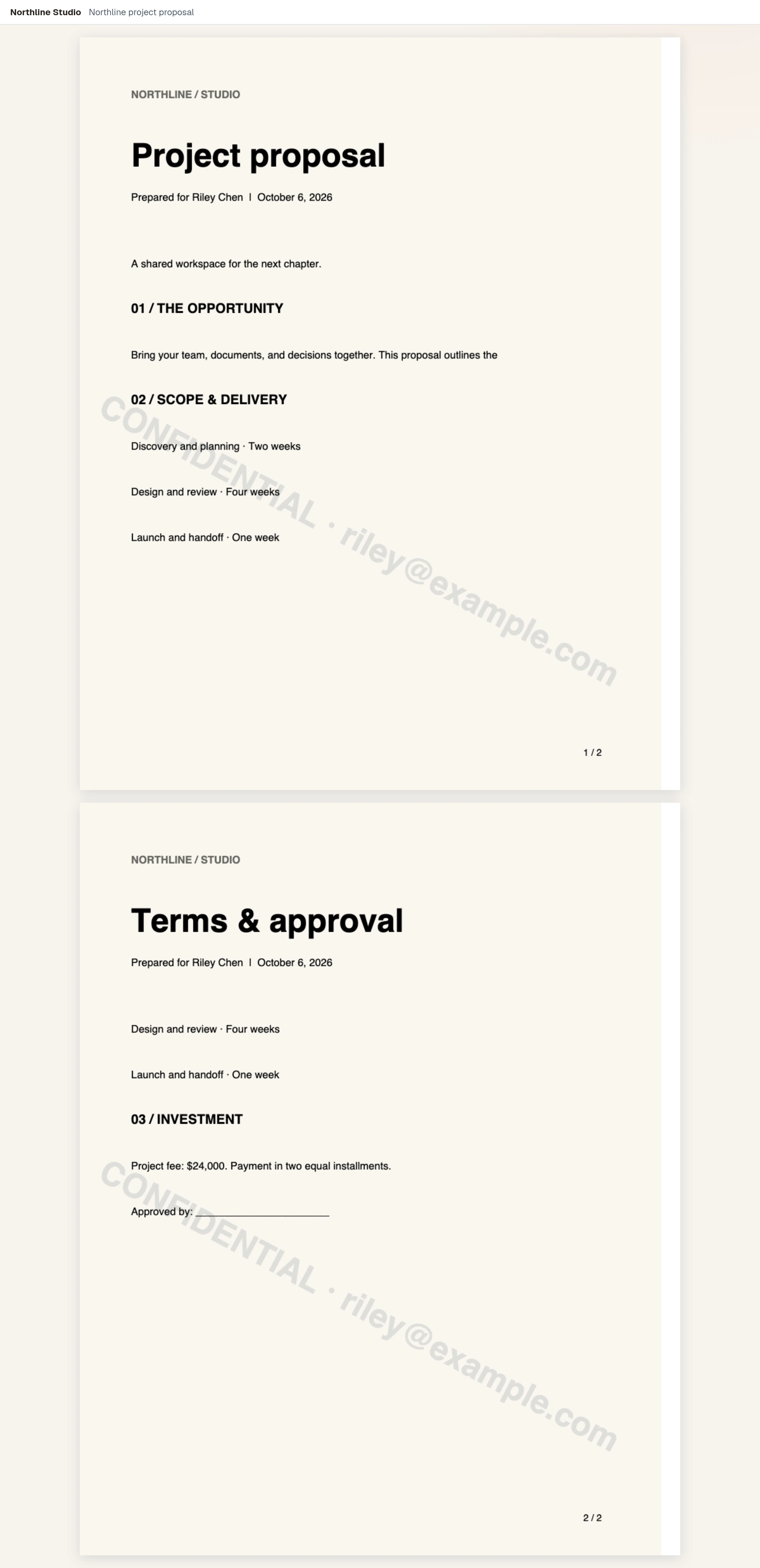
Shared PDF with a diagonal confidential watermark showing the recipient's email address

02One link per viewer

Prepare a distinct copy for each viewer

Use the recipient label associated with each controlled link so the document stays visibly connected to its audience

  • Distinct copies. Each recipient opens a copy marked with their own address.
  • Easy to prepare. Create the links from the document's page.
  • Tied to view history. Views are recorded for each link.
Document detail listing each recipient link and its viewing activity

03One checkbox

Switch it on when you create the link

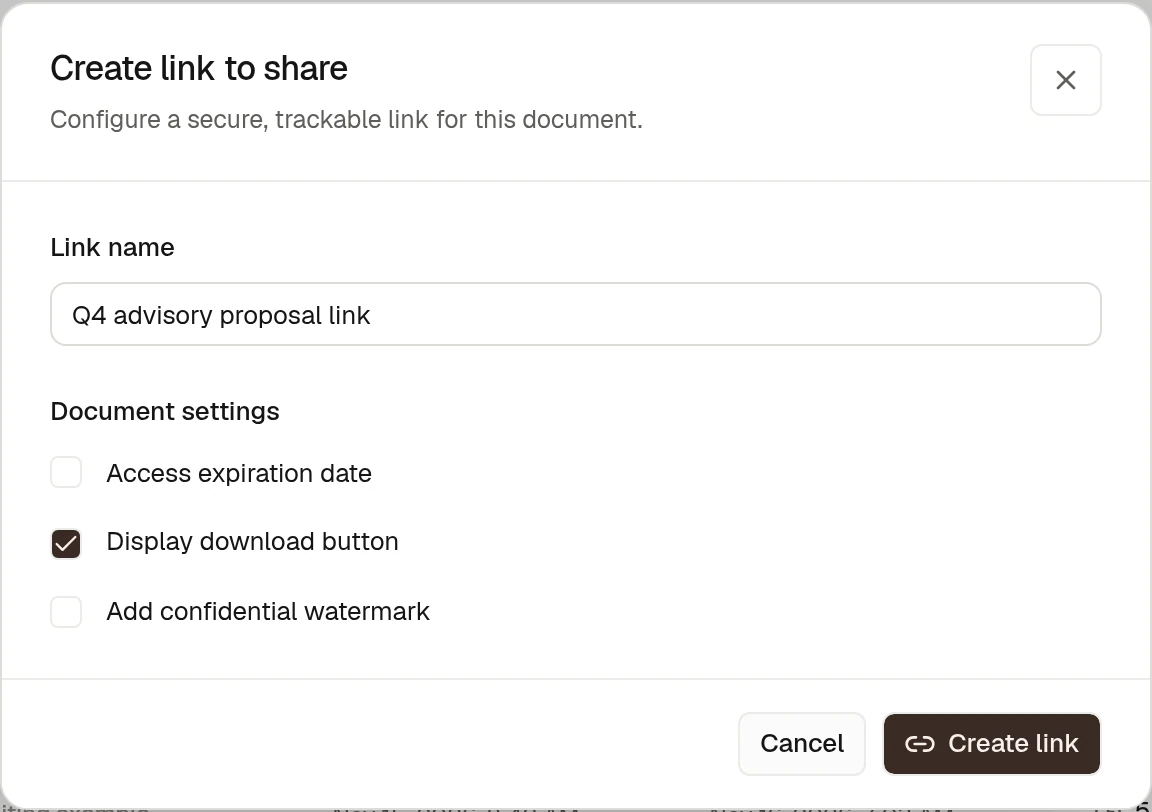
The watermark is a single setting beside the expiration date and the download button

  • Add confidential watermark. Tick it for the links that need it.
  • Set an expiry. Keep access to the period of the review.
  • View only. Hide the download button for sensitive files.
Create link dialog with the confidential watermark setting, the access expiration date and the download button option

04Access policy

Choose how confidential material can be accessed

Pair recipient watermarks with download permissions and revocable document links

  • Revocable. Unshare a link and the recipient sees that it is unavailable.
  • Other links unaffected. Each recipient's access is managed on its own.
  • Honest about limits. A watermark discourages forwarding. It does not prevent a screenshot.
Recipient page stating that the document is unavailable

Get started

Put the recipient’s name on the next handoff

Create a recipient link, enable its watermark, and review the viewing and download settings before sharing

  1. Create a confidential link

    Choose confidential mode or issue a recipient link through the tracked-assets API

  2. Choose the watermark

    Use the CONFIDENTIAL mark on its own, or with the recipient's email on a named link

  3. Set access

    Choose expiration, download permissions, and view limits

  4. Review activity

    Open document analytics to see viewing sessions and downloads for the link

Create a free account. Available on Pro.

Protect your next documentSet up recipient access

Use cases

For the files you want handled with care

Make the intended recipient visible on every page

01

Recipient-specific proposals

Place the intended viewer's email across each page to discourage casual forwarding

02

Partner and board material

Combine a clear confidentiality label with an expiring, non-downloadable viewer

03

Recurring confidential handoffs

Prepare labeled links for the people reviewing a confidential project and manage access as the work progresses

What's included

  • Recipient email in the watermark
  • Every-page browser coverage
  • Expiration
  • Download policy
  • Revocation
  • View history

Good to know

Clear about the limits

We would rather you trust Elite than be surprised by it. These are the boundaries worth knowing before you rely on it.

Security and privacy at Elite

  1. A watermark can discourage sharing, but it cannot prevent screenshots or copying
  2. Choose a confidential document workflow for watermarking; the standard compose insert does not add a watermark

Keep going

Works better together

Every Elite feature shares the same contacts, messages and history, so the next step is already in context

Secure Document Sharing

Share private files with access controls

Explore

Document Tracking

See document views and activity on each page

Explore

Signature Request

Send, track, and complete signature requests

Explore

Questions

Confidential Watermark FAQ

Answers about setup, compatibility, privacy, and day-to-day use

Visit the help center

Does the watermark modify my original PDF?

The confidential mark is rendered in the controlled browser viewer. The source file remains unchanged.

Can the watermark include a recipient email?

Yes. Recipient-specific link issuance can use the viewer email with a CONFIDENTIAL label.

Does it appear on every page?

The browser PDF viewer applies the mark across every rendered page, not only the first page.

How do I create a confidential link?

Choose confidential mode in the document workflow or issue a recipient-specific link through the authenticated tracked-assets API.

Get started

Keep your next confidential document clearly labeled

Make the intended recipient visible on every page

Protect your next documentCompare plansView all features
Elite Mail WorksElite Mail Works
Email TrackerWorkflowsSolutionsPricing
Log inStart free

Tracking

Elite Email TrackerFollow-up RemindersEmail Analytics

Outreach

CampaignsMail MergeEmail TemplatesVideo Messages

Requests & documents

Document RequestsVideo RequestsSignature RequestDocuments overviewDocument TrackingSecure Document SharingConfidential Watermark

Workspace

CRM for EmailTracker BlockingWorkflowsIntegrationsAI connections

Get Elite Mail Works

Chrome ExtensionEdge ExtensionFirefox ExtensionGmail™ Mobile Add-onOutlook Add-iniPhone & iPad AppAndroid App

Resources

BlogSign PDF OnlineSignature StudioEmail signature templatesGmail™ signature generatorOutlook signature generatorVideo RecorderEmail Tracking GuideWorkflow ExamplesTutorialsCustom EmailFAQs & Help CenterComparisons
View all features
Product
Elite Email TrackerFollow-up RemindersEmail AnalyticsCampaignsMail MergeEmail TemplatesVideo MessagesDocument RequestsVideo RequestsSignature RequestDocuments overviewDocument TrackingSecure Document SharingConfidential WatermarkCRM for EmailTracker BlockingWorkflowsIntegrationsAI connections
Download
Chrome ExtensionEdge ExtensionFirefox ExtensionGmail™ Mobile Add-onOutlook Add-iniPhone & iPad AppAndroid App
Resources
BlogSign PDF OnlineSignature StudioEmail signature templatesGmail™ signature generatorOutlook signature generatorVideo RecorderEmail Tracking GuideWorkflow ExamplesTutorialsCustom Email
WorkflowsSolutionsPricing
Log inStart free
Ask about Elite Mail Works on
Elite Mail WorksElite Mail Works
  • Download on the App Store
  • Get it on Google Play

Company

ContactAbout UsBrandingCareersPress

Features

Elite Email TrackerFollow-up RemindersEmail AnalyticsCampaignsMail MergeEmail TemplatesVideo MessagesDocument TrackingSecure Document SharingConfidential WatermarkSignature RequestCRM for EmailTracker BlockingDocument RequestsVideo Requests

Solutions

StartupsLawyers & AttorneysFreelancersHRTeachers & ProfessorsReal EstateMarketersSmall BusinessSales ProfessionalsAccountantsElite Mail Works for TeamsProposal Software

Download

Chrome ExtensionEdge ExtensionFirefox ExtensionGmail™ Mobile Add-onOutlook Add-iniPhone & iPad AppAndroid App

Resources

BlogSign PDF OnlineSignature StudioEmail signature templatesGmail™ signature generatorOutlook signature generatorVideo RecorderEmail Tracking GuideWorkflow ExamplesTutorialsCustom EmailWorkflowsDocuments overviewAI actionsIntegrationsEnterprisePricingFAQsComparisonsPrivacyTermsSecurity
  • Available in the Chrome Web Store
  • Add to Slack
  • Available on Microsoft Marketplace: Outlook add-in
  • Get it from Microsoft Edge
  • Get the Firefox add-on
  • Get it from Google Workspace Marketplace: Gmail add-on
  • Powered by AWS: system email delivery using Amazon SES
  • Protected by Cloudflare
  • Powered by Stripe: payment processing
  • elitemailsuite.com: green hosting through Cloudflare, checked by Green Web Foundation
  • Product HuntFind us onProduct Hunt

© 2026 Elite Mail Works. All rights reserved.

Gmail™, Google Workspace, Chrome, and Android are trademarks of Google LLC. Microsoft, Microsoft Edge, and Outlook are trademarks of the Microsoft group of companies. Yahoo and Yahoo Mail are trademarks of Yahoo Inc. Elite Mail Works is an independent product and is not affiliated with or endorsed by these companies.