Home/Features/Email Templates

Email templates, snippets and signaturesEmail templates for repeat work

Save introductions, proposals, and follow-ups in your content library. Personalize them before sending.

Build your email librarySee how it works
Create a free account. Available on Pro.See plans
Templates in the Elite Mail Works dashboard: a library of saved templates in folders, with their subject and usage
  • Three useful formats

    Save full messages, short snippets, or reusable signatures

  • Share with your team

    Keep content personal, team-shared, or organization-wide

  • Draft and publish

    Review changes before everyone sees them

Works with Gmail™ Outlook Yahoo Mail Chrome Edge Firefox

Why it mattersHow it worksGet startedUse casesGood to knowQuestions

Why it matters

You have already written your best email. Stop writing it again.

The introduction that works and the follow-up that gets replies are buried in your sent folder. A content library keeps them one click from your next draft.

Sent-folder archaeology

  • Search, copy, paste, fixEvery reuse starts by hunting for the last good version.
  • Leftover detailsThe previous recipient's name or price slips into the new email.
  • Everyone has their own versionThe team sends slightly different answers to the same question.

With Elite Mail Works

  • A searchable libraryTemplates, snippets and signatures organized in folders.
  • Variables for the detailsPlaceholders mark what to personalize each time.
  • Shared and approvedPublish content for yourself, your team or the whole organization.

How it works

Reusable content that still sounds like you

Save what works, share what is approved, and personalize every send

01Content library

Your best language, organized for reuse

Keep introductions, proposals, and follow-ups in a searchable content library

  • Templates for whole messages. Introductions, proposals and follow-ups with their subject line.
  • Folders and search. Organize by team or purpose and find a template by name.
  • A starter gallery. Begin from ready-made templates and make them yours.
Template library with folders on the left and templates listed with their subject, kind and usage

02Snippets

Insert the part you use every day

Save short passages as snippets and add them to an email without replacing the personal message around them

  • Short, reusable passages. Answers and paragraphs you type every week.
  • Insert without replacing. A snippet is added at the cursor, inside the message you are writing.
  • Signatures too. Saved signatures sit beside templates and snippets.
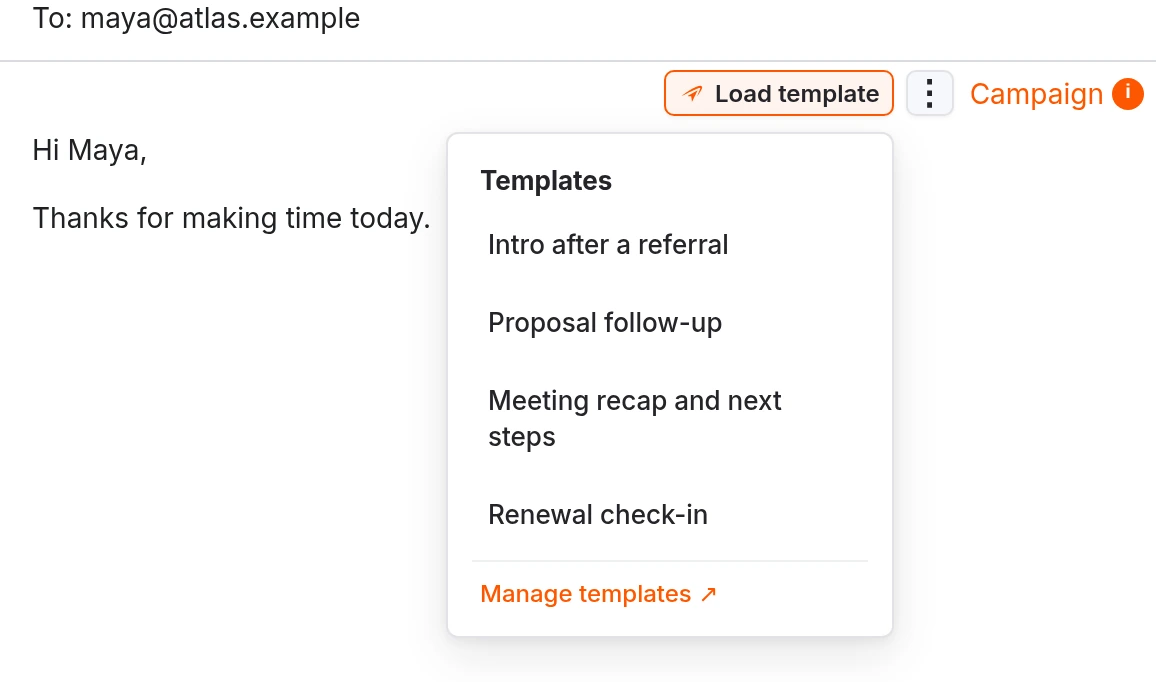
Elite template picker open in a Gmail™ reply, listing saved templates above a link to manage them

03Team sharing

Give the team approved content to work from

Share templates at the right team scope so colleagues start with consistent language

  • Personal, team or organization. Choose who can use each template.
  • Draft and publish. Work on a template before colleagues see it.
  • Permissions respected. Sharing follows the roles in your workspace.

04In your draft

Bring the template into your draft

Load reusable content while composing, then tailor the greeting, details, and next step for the recipient

  • Load while composing. Open your library from the compose window.
  • Personalize before sending. Adjust the greeting, details and next step.
  • Tracking still applies. A message written from a template is tracked like any other.
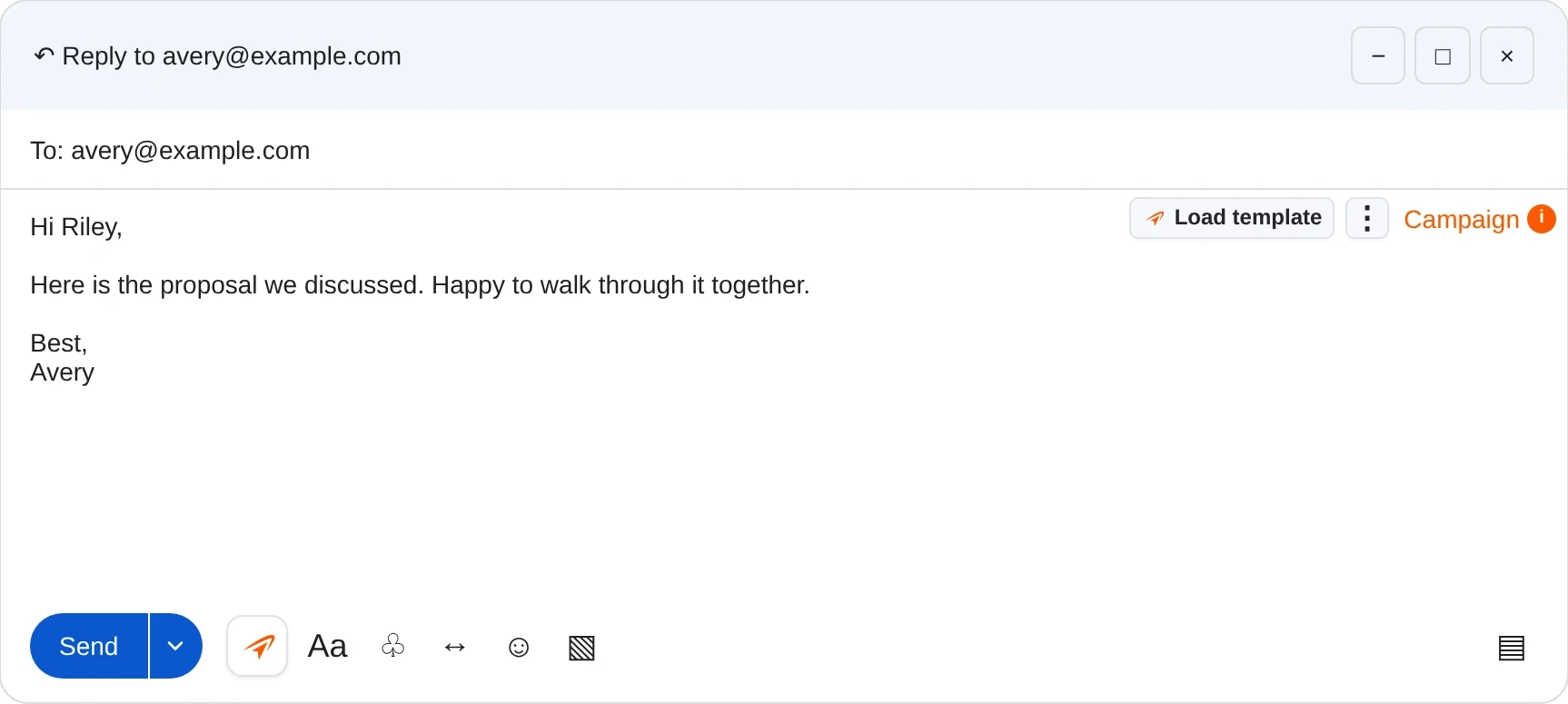
Gmail™ compose window with the Elite toolbar for templates, tracking and campaigns

Get started

Save the email you keep rewriting

Give the message a useful name, save it to your library, and leave room for the personal details you will change each time

  1. Save useful content

    Create a full template, a short snippet, or a signature

  2. Choose access

    Keep it personal or share it with your team according to your permissions

  3. Insert while writing

    Find approved content from the compose tools in supported webmail

  4. Keep it current

    Organize folders and publish updated versions when your message changes

Create a free account. Available on Pro.

Build your email libraryCreate your first template

Use cases

Write the personal part. Reuse the rest.

Keep the good writing. Make room for the personal details.

01

Approved sales language

Publish a reviewed template with subject, body, variables, and supporting links

02

Fast answers

Insert a snippet for pricing, onboarding, scheduling, or support without replacing the whole draft

03

Consistent sender identity

Manage reusable signatures separately from campaign footers and tracking pixels

What's included

  • Templates
  • Snippets
  • Signatures
  • Folders
  • Variables
  • Rich text
  • Personal/team/organization libraries

Good to know

Clear about the limits

We would rather you trust Elite than be surprised by it. These are the boundaries worth knowing before you rely on it.

Security and privacy at Elite

  1. Unsafe HTML is removed before insertion into compose
  2. Team permissions control shared content. Gmail™ mailbox content stays local and cannot be copied into cloud templates.

Keep going

Works better together

Every Elite feature shares the same contacts, messages and history, so the next step is already in context

Mail Merge

Turn contact data into personal email

Explore

Campaigns

Send personalized campaigns from your own inbox

Explore

Follow-up Reminders

Know when it is time to follow up

Explore

Questions

Email Templates FAQ

Answers about setup, compatibility, privacy, and day-to-day use

Visit the help center

What is the difference between a template and a snippet?

A template can provide a subject and full message body. A snippet is a smaller reusable block intended to be inserted into an existing draft.

Can a team share templates?

Yes. Content can be scoped to the individual, team, or organization, with draft and publishing controls.

Do templates support variables?

Yes. Variable resolution is available for personalized outreach, with preview and fallback behavior handled before campaign launch.

Will unsafe HTML be inserted into my email?

The compose integration removes active and unsafe elements and strips event-handler attributes before inserting rich content.

Get started

Give your best emails a second life

Keep the good writing. Make room for the personal details.

Build your email libraryCompare plansView all features
Elite Mail WorksElite Mail Works
Email TrackerWorkflowsSolutionsPricing
Log inStart free

Tracking

Elite Email TrackerFollow-up RemindersEmail Analytics

Outreach

CampaignsMail MergeEmail TemplatesVideo Messages

Requests & documents

Document RequestsVideo RequestsSignature RequestDocuments overviewDocument TrackingSecure Document SharingConfidential Watermark

Workspace

CRM for EmailTracker BlockingWorkflowsIntegrationsAI connections

Get Elite Mail Works

Chrome ExtensionEdge ExtensionFirefox ExtensionGmail™ Mobile Add-onOutlook Add-iniPhone & iPad AppAndroid App

Resources

BlogSign PDF OnlineSignature StudioEmail signature templatesGmail™ signature generatorOutlook signature generatorVideo RecorderEmail Tracking GuideWorkflow ExamplesTutorialsCustom EmailFAQs & Help CenterComparisons
View all features
Product
Elite Email TrackerFollow-up RemindersEmail AnalyticsCampaignsMail MergeEmail TemplatesVideo MessagesDocument RequestsVideo RequestsSignature RequestDocuments overviewDocument TrackingSecure Document SharingConfidential WatermarkCRM for EmailTracker BlockingWorkflowsIntegrationsAI connections
Download
Chrome ExtensionEdge ExtensionFirefox ExtensionGmail™ Mobile Add-onOutlook Add-iniPhone & iPad AppAndroid App
Resources
BlogSign PDF OnlineSignature StudioEmail signature templatesGmail™ signature generatorOutlook signature generatorVideo RecorderEmail Tracking GuideWorkflow ExamplesTutorialsCustom Email
WorkflowsSolutionsPricing
Log inStart free
Ask about Elite Mail Works on
Elite Mail WorksElite Mail Works
  • Download on the App Store
  • Get it on Google Play

Company

ContactAbout UsBrandingCareersPress

Features

Elite Email TrackerFollow-up RemindersEmail AnalyticsCampaignsMail MergeEmail TemplatesVideo MessagesDocument TrackingSecure Document SharingConfidential WatermarkSignature RequestCRM for EmailTracker BlockingDocument RequestsVideo Requests

Solutions

StartupsLawyers & AttorneysFreelancersHRTeachers & ProfessorsReal EstateMarketersSmall BusinessSales ProfessionalsAccountantsElite Mail Works for TeamsProposal Software

Download

Chrome ExtensionEdge ExtensionFirefox ExtensionGmail™ Mobile Add-onOutlook Add-iniPhone & iPad AppAndroid App

Resources

BlogSign PDF OnlineSignature StudioEmail signature templatesGmail™ signature generatorOutlook signature generatorVideo RecorderEmail Tracking GuideWorkflow ExamplesTutorialsCustom EmailWorkflowsDocuments overviewAI actionsIntegrationsEnterprisePricingFAQsComparisonsPrivacyTermsSecurity
  • Available in the Chrome Web Store
  • Add to Slack
  • Available on Microsoft Marketplace: Outlook add-in
  • Get it from Microsoft Edge
  • Get the Firefox add-on
  • Get it from Google Workspace Marketplace: Gmail add-on
  • Powered by AWS: system email delivery using Amazon SES
  • Protected by Cloudflare
  • Powered by Stripe: payment processing
  • elitemailsuite.com: green hosting through Cloudflare, checked by Green Web Foundation
  • Product HuntFind us onProduct Hunt

© 2026 Elite Mail Works. All rights reserved.

Gmail™, Google Workspace, Chrome, and Android are trademarks of Google LLC. Microsoft, Microsoft Edge, and Outlook are trademarks of the Microsoft group of companies. Yahoo and Yahoo Mail are trademarks of Yahoo Inc. Elite Mail Works is an independent product and is not affiliated with or endorsed by these companies.