Home/Solutions/Proposal Software

Proposal software with tracking and e-signaturesProposal software for email

Share a proposal, review page activity, and request a signature. Keep each step in one workspace.

Send your first signature requestSee how it works
Create a free account. Available on Pro.See plans
A proposal in the Elite Mail Works dashboard with a viewer expanded to show engagement by page
  • Sales proposals

    See whether the recipient reached pricing and next-step pages before following up

  • Freelance scopes

    Combine a concise walkthrough with a controlled scope document and signature fields

  • Professional services

    Issue separate links to stakeholders and preserve each access history instead of one forwarded attachment

Works withPDFPresentationsVideoSignatures Gmail™ Outlook

Why it mattersHow it worksGet startedUse casesGood to knowQuestions

Why it matters

A proposal is a conversation, not a file

Dedicated proposal builders ask you to rebuild every document in their editor. Elite works with the proposal you already have and adds what happens after you send it.

PDF by email

  • Sent, then silenceNo view of whether it was read.
  • Questions by emailLong threads to explain what a short video would.
  • Signature somewhere elseAnother tool, another login for the client.

With Elite Mail Works

  • A tracked proposal linkPage-level attention on scope, approach and investment.
  • A walkthrough attachedRecord your screen and explain the decisions.
  • Signature in the same flowFields, signer progress and a completion record.

How it works

Share, explain, sign

01Workflow

A proposal workflow that stays with the conversation

Prepare the document, add a walkthrough, review engagement, and collect the agreement from one connected workspace

  • Document, video, engagement and signature. One connected flow.
  • Stays with the email conversation. No separate portal to manage.
Document analytics list with each document's links, views, page coverage and last activity

02Proposal link

Share a proposal with a clear path through the material

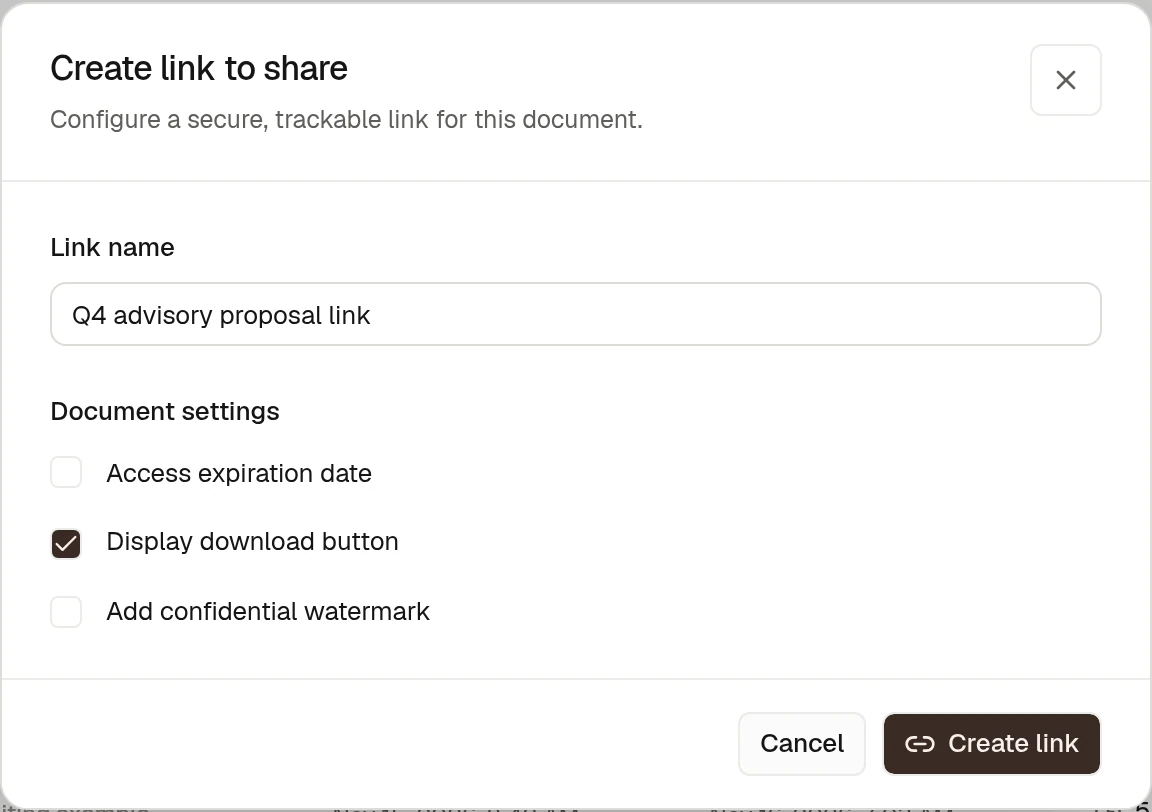
Use a controlled document link and review page-level attention on scope, approach, and investment

  • Controlled access. Expiration and download settings.
  • Page-level attention. See what mattered.
Create link dialog with settings for an access expiration date, the download button and a confidential watermark

03Walkthrough

Explain the decisions behind the proposal

Add a short recording to walk the recipient through the approach and the next steps

  • Explain the decisions. In your own voice.
  • Linked from the email. A preview card opens the recording.
Choose how to record: camera only, screen and camera, or screen only

04Signature

Complete the proposal with a signed agreement

Assign the recipient fields and keep the signed document and its completion record together

  • Recipient fields. Signature, name and date.
  • Signed copy and record. Kept together.
  • Proposal analytics measure the controlled viewer, not copies downloaded or shared outside it
Signature requests list with signer counts, status, progress and dates

Get started

Bring the agreement that is ready for a decision

Add the document, place its fields, and assign each one to the right signer. Review the request before inviting anyone.

  1. Upload your proposal

    Use the PDF or deck you already have

  2. Share with controls

    Create a link, add a walkthrough and choose expiration and download settings

  3. Follow up and collect the signature

    Reach out when it is read, then send the agreement to sign

Create a free account. Available on Pro.

Send your first signature requestPrepare a signature request

Use cases

Where it fits into your work

Keep the whole proposal journey in one connected workspace

01

Share the proposal

Send a controlled document link with the scope and pricing in the conversation

02

Prepare the follow-up

Set the waiting period and review the prepared message when the next action is due

03

Finish the agreement

Collect signatures and keep the completed file and audit record with the request

What's included

  • Proposal viewer
  • Page analytics
  • Video walkthrough
  • Access controls
  • E-signature
  • Real-time alerts

Good to know

Clear about the limits

We would rather you trust Elite than be surprised by it. These are the boundaries worth knowing before you rely on it.

Security and privacy at Elite

  1. Proposal analytics measure the controlled viewer, not copies downloaded or shared outside it
  2. Electronic-signature and retention requirements vary; configure the workflow around your agreement and jurisdiction

Keep going

The features behind this workflow

Every Elite feature shares the same contacts, messages and history, so the next step is already in context

Document Tracking

See document views and activity on each page

Explore

Video Messages

Record your screen and send it by email

Explore

Signature Request

Send, track, and complete signature requests

Explore

Questions

Proposal Software FAQ

Answers about setup, compatibility, privacy, and day-to-day use

Visit the help center

Can I see which pages were viewed?

Yes. PDF analytics include page numbers, visible coverage, dwell, sessions, and timestamps from the controlled viewer.

Can I turn off downloading?

Yes, per link.

Can I revoke a proposal after sending?

Yes. Revoking the link stops the public route without recalling the original email.

Is signing built into the viewer?

Signature Requests is a connected guided workflow with fields, signers, access controls, reminders, completed PDFs, and audit evidence.

Get started

Move your next opportunity forward

Keep the whole proposal journey in one connected workspace

Send your first signature requestCompare plansView all features
Elite Mail WorksElite Mail Works
Email TrackerWorkflowsSolutionsPricing
Log inStart free

Tracking

Elite Email TrackerFollow-up RemindersEmail Analytics

Outreach

CampaignsMail MergeEmail TemplatesVideo Messages

Requests & documents

Document RequestsVideo RequestsSignature RequestDocuments overviewDocument TrackingSecure Document SharingConfidential Watermark

Workspace

CRM for EmailTracker BlockingWorkflowsIntegrationsAI connections

Get Elite Mail Works

Chrome ExtensionEdge ExtensionFirefox ExtensionGmail™ Mobile Add-onOutlook Add-iniPhone & iPad AppAndroid App

Resources

BlogSign PDF OnlineSignature StudioEmail signature templatesGmail™ signature generatorOutlook signature generatorVideo RecorderEmail Tracking GuideWorkflow ExamplesTutorialsCustom EmailFAQs & Help CenterComparisons
View all features
Product
Elite Email TrackerFollow-up RemindersEmail AnalyticsCampaignsMail MergeEmail TemplatesVideo MessagesDocument RequestsVideo RequestsSignature RequestDocuments overviewDocument TrackingSecure Document SharingConfidential WatermarkCRM for EmailTracker BlockingWorkflowsIntegrationsAI connections
Download
Chrome ExtensionEdge ExtensionFirefox ExtensionGmail™ Mobile Add-onOutlook Add-iniPhone & iPad AppAndroid App
Resources
BlogSign PDF OnlineSignature StudioEmail signature templatesGmail™ signature generatorOutlook signature generatorVideo RecorderEmail Tracking GuideWorkflow ExamplesTutorialsCustom Email
WorkflowsSolutionsPricing
Log inStart free
Ask about Elite Mail Works on
Elite Mail WorksElite Mail Works
  • Download on the App Store
  • Get it on Google Play

Company

ContactAbout UsBrandingCareersPress

Features

Elite Email TrackerFollow-up RemindersEmail AnalyticsCampaignsMail MergeEmail TemplatesVideo MessagesDocument TrackingSecure Document SharingConfidential WatermarkSignature RequestCRM for EmailTracker BlockingDocument RequestsVideo Requests

Solutions

StartupsLawyers & AttorneysFreelancersHRTeachers & ProfessorsReal EstateMarketersSmall BusinessSales ProfessionalsAccountantsElite Mail Works for TeamsProposal Software

Download

Chrome ExtensionEdge ExtensionFirefox ExtensionGmail™ Mobile Add-onOutlook Add-iniPhone & iPad AppAndroid App

Resources

BlogSign PDF OnlineSignature StudioEmail signature templatesGmail™ signature generatorOutlook signature generatorVideo RecorderEmail Tracking GuideWorkflow ExamplesTutorialsCustom EmailWorkflowsDocuments overviewAI actionsIntegrationsEnterprisePricingFAQsComparisonsPrivacyTermsSecurity
  • Available in the Chrome Web Store
  • Add to Slack
  • Available on Microsoft Marketplace: Outlook add-in
  • Get it from Microsoft Edge
  • Get the Firefox add-on
  • Get it from Google Workspace Marketplace: Gmail add-on
  • Powered by AWS: system email delivery using Amazon SES
  • Protected by Cloudflare
  • Powered by Stripe: payment processing
  • elitemailsuite.com: green hosting through Cloudflare, checked by Green Web Foundation
  • Product HuntFind us onProduct Hunt

© 2026 Elite Mail Works. All rights reserved.

Gmail™, Google Workspace, Chrome, and Android are trademarks of Google LLC. Microsoft, Microsoft Edge, and Outlook are trademarks of the Microsoft group of companies. Yahoo and Yahoo Mail are trademarks of Yahoo Inc. Elite Mail Works is an independent product and is not affiliated with or endorsed by these companies.