Home/Features/Document Requests

Document collection and file requestsCollect the documents you need

Send a checklist and private upload link. Review customer files, follow up on missing items, and request replacements from one workspace.

Request your first documentsSee how it works
Free includes 5 document requests total. File and storage limits apply.See plans
Document requests in the Elite Mail Works dashboard: each request with its recipient, uploaded count, due date and status
  • A clear checklist

    Name each document, mark required items, and add instructions and a due date

  • An easy handoff

    Send the request by email or share its private upload link

  • Review every item

    Accept submitted files or explain what needs replacing before completing the request

Works withAny modern browserNo recipient account Gmail™ Outlook Yahoo Mail

Why it mattersHow it worksGet startedUse casesGood to knowQuestions

Why it matters

“Can you send me those documents?” should not take nine emails

Collecting files by email means scattered attachments, missing items and reminders written from memory. A checklist with an upload link shows both sides what is still needed.

Collecting by email

  • Scattered attachmentsFiles arrive across several threads and in the wrong format.
  • No shared listThe client is unsure what is left. So are you.
  • Awkward correctionsAsking for a clearer copy starts another thread.

With Elite Mail Works

  • One checklistName each document, mark what is required and set a due date.
  • A private upload pageRecipients upload against each item without creating an account.
  • Review item by itemAccept a file or request a replacement with a note.

How it works

Ask once. Collect everything.

A clear request for them, a complete set of documents for you

01Checklist

Give customers one clear document checklist

Name the files you need, mark each as required or optional, add instructions and a due date, then send a private upload link

  • Required and optional items. Each item has a name and a required setting.
  • One set of instructions. Explain what you need at the top of the request.
  • Email it or copy the link. Elite can send the request, or prepare a private link for your own message.
  • Create a request from the dashboard, the browser extension, the Gmail™ add-on or the Outlook add-in
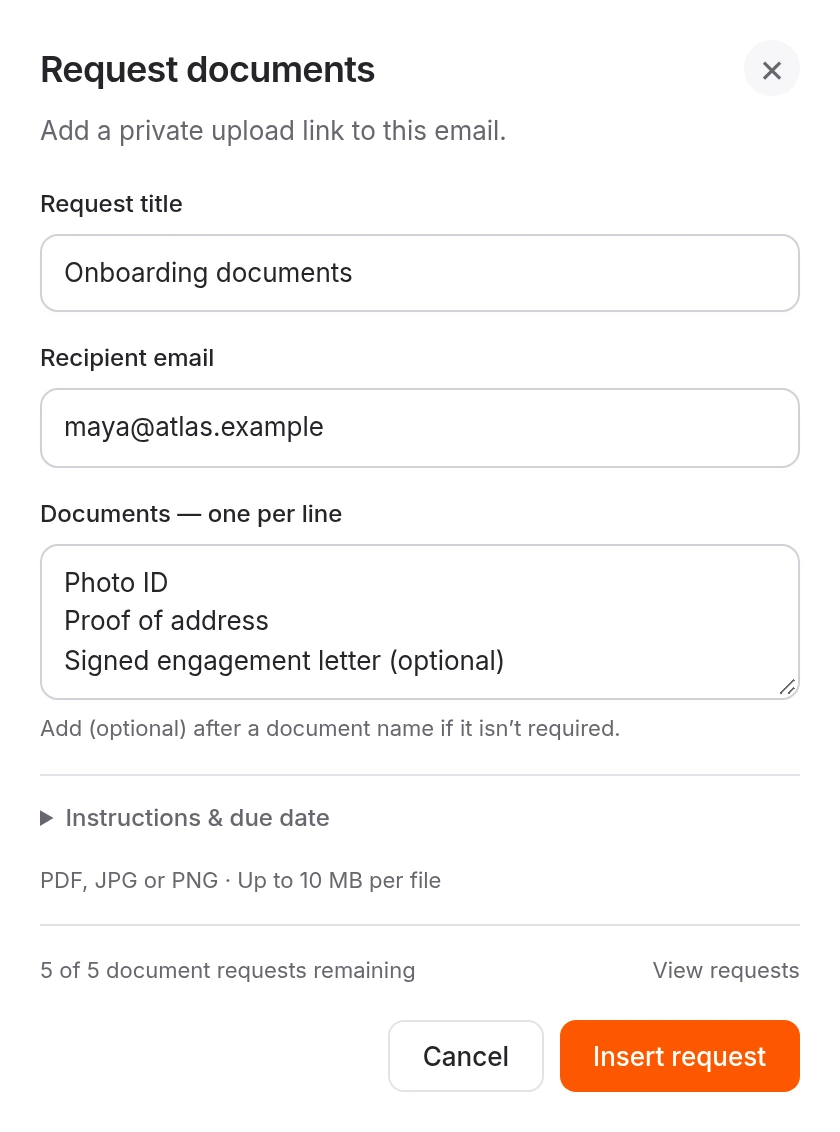
Request documents panel from the Elite browser extension with a request title, recipient email and a list of documents

02Upload page

An upload page that makes the next step clear

Recipients see the requested items and upload their files without creating an account. Required items stay visible until submitted.

  • No account needed. The private link is all the recipient needs.
  • Clear progress. Required items stay visible until they are uploaded.
  • Works on a phone. PDF, JPG or PNG, up to 10 MB per file.
  • Anyone with the link can upload, so share it only with the intended recipient
Recipient upload page with the checklist of requested documents and a choose file button for each

03Review

Review each item and explain what needs changing

Accept the files that are ready and request replacements with a specific note for any item that needs updating

  • Accept what is ready. Mark each file as accepted.
  • Request a replacement. Add a note saying what needs to change.
  • The recipient is told. They return to the same link to upload again.
Document request with each requested item, its uploaded file, accept and request replacement actions and the activity history

04Completion

Know when the checklist is ready to close

Keep accepted documents and the request history together, with a clear completion state for the work that follows

  • A clear status. Awaiting documents, ready for review, changes requested, completed, canceled or expired.
  • Files and history together. Every upload, version and event stays with the request.
  • Send a reminder. Nudge the recipient with one button when something is missing.
Document requests list with uploaded counts, due dates and statuses from awaiting documents to completed

Get started

Start with one checklist

Name the files you need, choose a recipient, and share the private upload link

  1. Build the request

    List required and optional documents, write instructions, and choose a recipient and due date

  2. Share the private link

    Send the request by email or add the link to your own conversation

  3. Collect the submission

    The recipient uploads files against your checklist and submits them without an Elite account

  4. Review each document

    Accept an item or request a replacement with a review note. Complete the request when the required items are accepted.

Free includes 5 document requests total. File and storage limits apply.

Request your first documents

Use cases

Where it fits into your work

01

Client onboarding

Collect project briefs, reference files, and business documents before work begins

02

Accounting and bookkeeping

Request a checklist of statements and supporting paperwork, then follow up on missing items

03

Hiring and project handoffs

Give candidates or collaborators a clear list of the files they need to provide

What's included

  • Document checklists
  • Required and optional items
  • Private upload links
  • No recipient account
  • Due dates
  • Reminders
  • Item-by-item review
  • Replacement requests

Good to know

Clear about the limits

We would rather you trust Elite than be surprised by it. These are the boundaries worth knowing before you rely on it.

Security and privacy at Elite

  1. A private link grants access to the request. Share it only with the intended recipient; possession of the link does not verify identity.
  2. Uploaded document content is encrypted at rest. Requests expire and can be canceled. File and storage limits apply.
  3. Suitability for regulated or sensitive information depends on your requirements and the available safeguards and agreements. This feature does not establish healthcare or education compliance.

Keep going

Works better together

Every Elite feature shares the same contacts, messages and history, so the next step is already in context

Signature Request

Send, track, and complete signature requests

Explore

Video Requests

Invite someone to record and submit a presentation or walkthrough

Explore

Secure Document Sharing

Share private files with access controls

Explore

Questions

Document Requests FAQ

Answers about setup, compatibility, privacy, and day-to-day use

Visit the help center

Are missing-document reminders automatic?

Document request reminders are sent manually from the request workflow. Review the outstanding checklist before sending; you can send another reminder after 24 hours. A due date does not create an automatic reminder schedule. Review submitted files and request a replacement when an item needs changing. Copy a missing-document reminder template. Follow the document collection workflow.

Can I collect client documents for free, and what are the limits?

The Free plan includes five document requests in total, rather than five per month. Deleting a request does not restore the allowance. The sender needs an Elite account; recipients upload through their private request link without one. File and storage limits apply. Check current plans before starting a larger collection. Compare document request allowances.

Does the recipient need an account?

No. The recipient opens the private request link, uploads the checklist items, and submits them for your review.

Can I ask for a replacement?

Yes. Review an item and add a note explaining what needs replacing. The recipient receives a request to update it.

How is this different from document tracking?

Document requests collect files from someone else. Document tracking records activity on documents you share through Elite's viewer.

Can I set a due date and send a reminder?

Yes. Add a due date when creating the request and send reminders for outstanding submissions. The request also has an expiration date.

Get started

Get more from your next email

Collect customer files with a checklist and private upload link

Request your first documentsCompare plansView all features
Elite Mail WorksElite Mail Works
Email TrackerWorkflowsSolutionsPricing
Log inStart free

Tracking

Elite Email TrackerFollow-up RemindersEmail Analytics

Outreach

CampaignsMail MergeEmail TemplatesVideo Messages

Requests & documents

Document RequestsVideo RequestsSignature RequestDocuments overviewDocument TrackingSecure Document SharingConfidential Watermark

Workspace

CRM for EmailTracker BlockingWorkflowsIntegrationsAI connections

Get Elite Mail Works

Chrome ExtensionEdge ExtensionFirefox ExtensionGmail™ Mobile Add-onOutlook Add-iniPhone & iPad AppAndroid App

Resources

BlogSign PDF OnlineSignature StudioEmail signature templatesGmail™ signature generatorOutlook signature generatorVideo RecorderEmail Tracking GuideWorkflow ExamplesTutorialsCustom EmailFAQs & Help CenterComparisons
View all features
Product
Elite Email TrackerFollow-up RemindersEmail AnalyticsCampaignsMail MergeEmail TemplatesVideo MessagesDocument RequestsVideo RequestsSignature RequestDocuments overviewDocument TrackingSecure Document SharingConfidential WatermarkCRM for EmailTracker BlockingWorkflowsIntegrationsAI connections
Download
Chrome ExtensionEdge ExtensionFirefox ExtensionGmail™ Mobile Add-onOutlook Add-iniPhone & iPad AppAndroid App
Resources
BlogSign PDF OnlineSignature StudioEmail signature templatesGmail™ signature generatorOutlook signature generatorVideo RecorderEmail Tracking GuideWorkflow ExamplesTutorialsCustom Email
WorkflowsSolutionsPricing
Log inStart free
Ask about Elite Mail Works on
Elite Mail WorksElite Mail Works
  • Download on the App Store
  • Get it on Google Play

Company

ContactAbout UsBrandingCareersPress

Features

Elite Email TrackerFollow-up RemindersEmail AnalyticsCampaignsMail MergeEmail TemplatesVideo MessagesDocument TrackingSecure Document SharingConfidential WatermarkSignature RequestCRM for EmailTracker BlockingDocument RequestsVideo Requests

Solutions

StartupsLawyers & AttorneysFreelancersHRTeachers & ProfessorsReal EstateMarketersSmall BusinessSales ProfessionalsAccountantsElite Mail Works for TeamsProposal Software

Download

Chrome ExtensionEdge ExtensionFirefox ExtensionGmail™ Mobile Add-onOutlook Add-iniPhone & iPad AppAndroid App

Resources

BlogSign PDF OnlineSignature StudioEmail signature templatesGmail™ signature generatorOutlook signature generatorVideo RecorderEmail Tracking GuideWorkflow ExamplesTutorialsCustom EmailWorkflowsDocuments overviewAI actionsIntegrationsEnterprisePricingFAQsComparisonsPrivacyTermsSecurity
  • Available in the Chrome Web Store
  • Add to Slack
  • Available on Microsoft Marketplace: Outlook add-in
  • Get it from Microsoft Edge
  • Get the Firefox add-on
  • Get it from Google Workspace Marketplace: Gmail add-on
  • Powered by AWS: system email delivery using Amazon SES
  • Protected by Cloudflare
  • Powered by Stripe: payment processing
  • elitemailsuite.com: green hosting through Cloudflare, checked by Green Web Foundation
  • Product HuntFind us onProduct Hunt

© 2026 Elite Mail Works. All rights reserved.

Gmail™, Google Workspace, Chrome, and Android are trademarks of Google LLC. Microsoft, Microsoft Edge, and Outlook are trademarks of the Microsoft group of companies. Yahoo and Yahoo Mail are trademarks of Yahoo Inc. Elite Mail Works is an independent product and is not affiliated with or endorsed by these companies.