Home/Solutions/Teachers & Professors

Email and recording requests for teachersEmail and recording requests for education

Request recorded presentations and project documents. Reuse messages for learners and colleagues, share files, and follow up on outstanding work.

Request your first recordingSee how it works
Free includes 5 video requests total. Recording size limits apply.See plans
Video requests in the Elite Mail Works dashboard: each request with its recipient and status
  • Recorded presentations

    Give learners a project prompt and a private link to record, preview, and submit a presentation in a supported browser

  • Project documents

    Request a checklist of project files and explain what needs replacing during review

  • Department communication

    Reuse messages, share controlled files, and follow up on outstanding responses

Works with Gmail™ OutlookVideo requestsDocument requestsTemplates

Why it mattersHow it worksGet startedUse casesGood to knowQuestions

Why it matters

Collecting work should not be the hardest part of the assignment

Recorded presentations arrive as huge attachments, drive links with the wrong permissions or not at all. Elite gives every learner the same simple page and gives you one place to review.

Attachments and drive links

  • Files too large to sendRecordings bounce or need a separate upload.
  • Permissions problems“Request access” the night before marking.
  • No overviewA spreadsheet to track who has submitted.

With Elite Mail Works

  • Record in the browserLearners record, preview and submit from a private link.
  • A clear promptInstructions and a due date are on the page.
  • Review in one placeAccept a submission or ask for another take with feedback.

How it works

From a project prompt to a reviewed submission

01Programme view

Coordinate the people behind your programme

Bring individualized announcements, shared materials, and follow-up reminders into your everyday email workflow

  • Announcements, materials and requests. In your everyday email.
  • Outstanding items. See who still needs to respond.
Video requests list with each recipient and status, from awaiting video to completed

02Announcements

Prepare announcements that reach each person individually

Preview recipient names and departments before sending separate messages from your connected inbox

  • Individual messages. Each learner or colleague receives their own email.
  • Preview first. Check names and groups before sending.
Campaign list with recipients, open rate, unsubscribe rate and bounce rate for each campaign

03Reminders

Bring unanswered messages back into view

Return to the original conversation with a reminder and the programme details close at hand

  • Unanswered messages return. With the original conversation.
  • Your decision. A reminder prompts you. It does not send for you.
Reminders listing conditional follow-ups with their condition, due time and status

04Materials

Keep programme materials and follow-ups connected

Share a controlled programme link and follow up on outstanding administrative replies

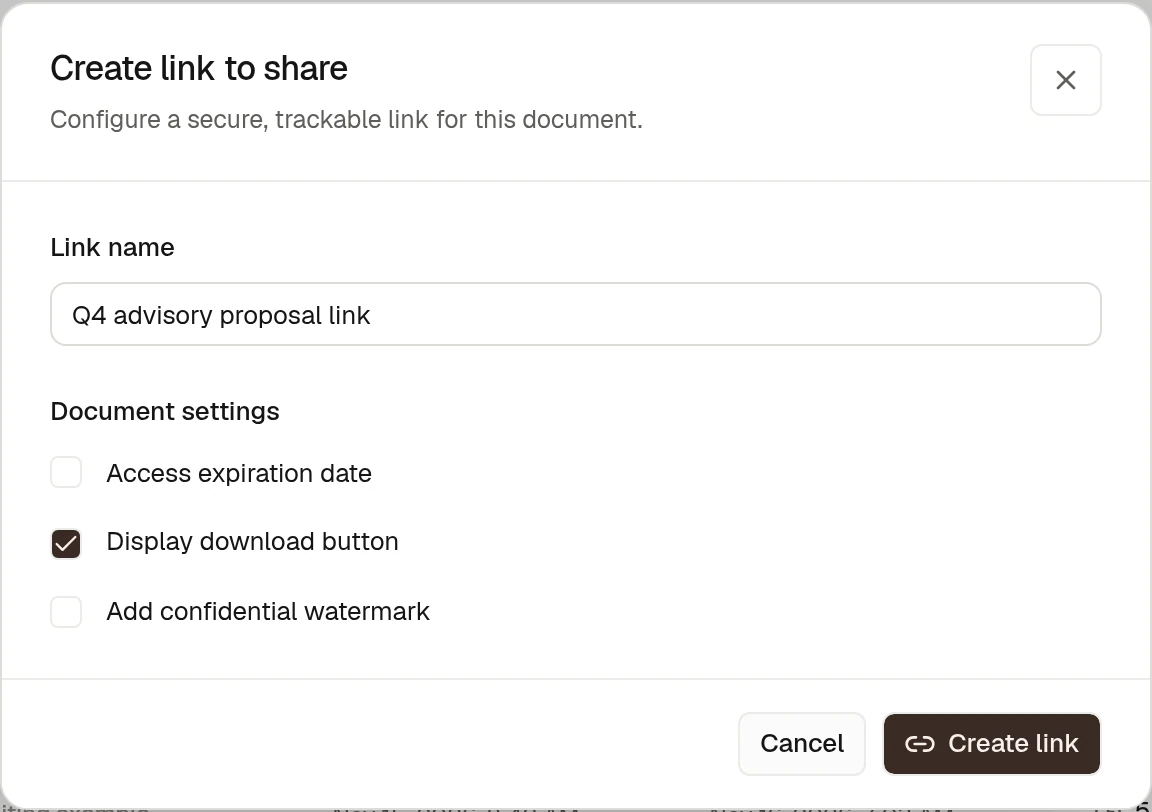
  • Controlled links. Share programme documents with an expiry.
  • Follow up on admin. Keep replies and files connected.
  • Do not use email tracking as a proxy for attendance, effort or academic performance
Create link dialog with settings for an access expiration date, the download button and a confidential watermark

Get started

Give someone a clear recording prompt

Add instructions and a recipient, share the request, and return to review the recording

  1. Connect your inbox

    Send from your institutional or personal address

  2. Write the prompt once

    Describe the recording or documents you need and set a due date

  3. Review as responses arrive

    Watch, accept or request a new take

Free includes 5 video requests total. Recording size limits apply.

Request your first recording

Use cases

Where it fits into your work

Make important information easier to send and follow through on

01

Recorded presentations

Request a project recording, review the learner's submission, and give clear feedback when another take is needed

02

Family forms

Share the required form and keep a list of responses still outstanding

03

Department requests

Prepare a reminder for a colleague’s reply or a document you’re waiting for

04

Research correspondence

Keep contacts, shared files, and follow-up dates together. An open is not evidence of participation.

What's included

  • Class announcements
  • Recommendation letters
  • Department outreach
  • Document sharing
  • Follow-up reminders
  • Privacy-aware signals

Good to know

Clear about the limits

We would rather you trust Elite than be surprised by it. These are the boundaries worth knowing before you rely on it.

Security and privacy at Elite

  1. Do not use email tracking as a proxy for attendance, learning, disability status, effort, or academic performance
  2. Review your school’s privacy, consent, accessibility, and retention requirements before deployment

Keep going

The features behind this workflow

Every Elite feature shares the same contacts, messages and history, so the next step is already in context

Video Requests

Invite someone to record and submit a presentation or walkthrough

Explore

Document Requests

Collect customer files with a checklist and private upload link

Explore

Campaigns

Send personalized campaigns from your own inbox

Explore

Questions

Teachers & Professors FAQ

Answers about setup, compatibility, privacy, and day-to-day use

Visit the help center

Can this prove a student read an announcement?

No. Image requests are imperfect signals and may be blocked, proxied, or automated.

Can recipients be hidden from one another?

Yes. Individualized campaigns send one provider message per recipient rather than exposing a group address list.

Can documents expire after a course ends?

Yes. Controlled links can carry expiration and revocation settings.

Does it work with school Gmail™ or Microsoft 365?

It supports Gmail™ and Outlook web surfaces, subject to the administrator's extension, add-on, OAuth, and provider policies.

Get started

Move your next opportunity forward

Make important information easier to send and follow through on

Request your first recordingCompare plansView all features
Elite Mail WorksElite Mail Works
Email TrackerWorkflowsSolutionsPricing
Log inStart free

Tracking

Elite Email TrackerFollow-up RemindersEmail Analytics

Outreach

CampaignsMail MergeEmail TemplatesVideo Messages

Requests & documents

Document RequestsVideo RequestsSignature RequestDocuments overviewDocument TrackingSecure Document SharingConfidential Watermark

Workspace

CRM for EmailTracker BlockingWorkflowsIntegrationsAI connections

Get Elite Mail Works

Chrome ExtensionEdge ExtensionFirefox ExtensionGmail™ Mobile Add-onOutlook Add-iniPhone & iPad AppAndroid App

Resources

BlogSign PDF OnlineSignature StudioEmail signature templatesGmail™ signature generatorOutlook signature generatorVideo RecorderEmail Tracking GuideWorkflow ExamplesTutorialsCustom EmailFAQs & Help CenterComparisons
View all features
Product
Elite Email TrackerFollow-up RemindersEmail AnalyticsCampaignsMail MergeEmail TemplatesVideo MessagesDocument RequestsVideo RequestsSignature RequestDocuments overviewDocument TrackingSecure Document SharingConfidential WatermarkCRM for EmailTracker BlockingWorkflowsIntegrationsAI connections
Download
Chrome ExtensionEdge ExtensionFirefox ExtensionGmail™ Mobile Add-onOutlook Add-iniPhone & iPad AppAndroid App
Resources
BlogSign PDF OnlineSignature StudioEmail signature templatesGmail™ signature generatorOutlook signature generatorVideo RecorderEmail Tracking GuideWorkflow ExamplesTutorialsCustom Email
WorkflowsSolutionsPricing
Log inStart free
Ask about Elite Mail Works on
Elite Mail WorksElite Mail Works
  • Download on the App Store
  • Get it on Google Play

Company

ContactAbout UsBrandingCareersPress

Features

Elite Email TrackerFollow-up RemindersEmail AnalyticsCampaignsMail MergeEmail TemplatesVideo MessagesDocument TrackingSecure Document SharingConfidential WatermarkSignature RequestCRM for EmailTracker BlockingDocument RequestsVideo Requests

Solutions

StartupsLawyers & AttorneysFreelancersHRTeachers & ProfessorsReal EstateMarketersSmall BusinessSales ProfessionalsAccountantsElite Mail Works for TeamsProposal Software

Download

Chrome ExtensionEdge ExtensionFirefox ExtensionGmail™ Mobile Add-onOutlook Add-iniPhone & iPad AppAndroid App

Resources

BlogSign PDF OnlineSignature StudioEmail signature templatesGmail™ signature generatorOutlook signature generatorVideo RecorderEmail Tracking GuideWorkflow ExamplesTutorialsCustom EmailWorkflowsDocuments overviewAI actionsIntegrationsEnterprisePricingFAQsComparisonsPrivacyTermsSecurity
  • Available in the Chrome Web Store
  • Add to Slack
  • Available on Microsoft Marketplace: Outlook add-in
  • Get it from Microsoft Edge
  • Get the Firefox add-on
  • Get it from Google Workspace Marketplace: Gmail add-on
  • Powered by AWS: system email delivery using Amazon SES
  • Protected by Cloudflare
  • Powered by Stripe: payment processing
  • elitemailsuite.com: green hosting through Cloudflare, checked by Green Web Foundation
  • Product HuntFind us onProduct Hunt

© 2026 Elite Mail Works. All rights reserved.

Gmail™, Google Workspace, Chrome, and Android are trademarks of Google LLC. Microsoft, Microsoft Edge, and Outlook are trademarks of the Microsoft group of companies. Yahoo and Yahoo Mail are trademarks of Yahoo Inc. Elite Mail Works is an independent product and is not affiliated with or endorsed by these companies.