Home/Features/Follow-up Reminders

Email follow-up reminders and automationEmail follow-up reminders

Choose when a conversation needs your attention. Outlook supports reply-aware reminders, drafts, and automatic follow-ups.

Build your first workflowSee how it works
Create a free account. Available on Pro.See plans
Workflows in the Elite Mail Works dashboard: the priority inbox ranks conversations by stage, opens, clicks and replies, beside tabs for reminders, scheduled sends, activity and rules
  • Remember the next step

    Bring an important conversation back at the time you choose

  • Choose how to follow up

    Set a reminder, or use Outlook for reply-aware drafts and automatic follow-ups

  • Set clear boundaries

    Choose the timing and stop conditions. Gmail™ sequences cannot detect replies or bounces.

Works with Gmail™ Outlook Chrome Edge Firefox iOS Android

Why it mattersHow it worksGet startedUse casesGood to knowQuestions

Why it matters

Most deals are not lost. They are forgotten.

A snoozed email or a calendar note only works if you remember why you set it. Elite keeps the reminder attached to the conversation and to what has happened since.

Snooze, stars and memory

  • Reminders with no contextThe message returns to your inbox, but you still have to work out whether anything changed.
  • Manual stop rulesIf the person already replied, it is on you to notice before sending an awkward nudge.
  • One speed for everythingA warm proposal and a cold introduction get the same generic reminder.

With Elite Mail Works

  • A queue built from activityDue follow-ups appear with the latest opens and clicks beside them.
  • Stop conditions you chooseOutlook follow-ups can stop when a reply arrives. Gmail™ sequences state clearly what they cannot detect.
  • Three levels of automationRemind me, prepare a draft, or send for me. You decide how far each rule goes.

How it works

From a quiet thread to a timely reply

Set the rule once. Elite brings the conversation back with everything you need to act.

01Priority inbox

A focused queue for your next follow-up

Bring unanswered messages back at the right time, with the conversation and its latest activity close at hand

  • One place to start the day. Conversations are ranked by their latest activity, with opens, clicks and replies on each row.
  • Reminders and scheduled sends beside it. Each has its own tab, so nothing due is hidden in a folder.
  • Change your mind. Snooze a reminder for a day or cancel it.
Priority inbox listing conversations with their stage, provider, opens, clicks, replies and last activity

02Rules

Choose how far the follow-up goes

Be notified, create a reminder, prepare a draft in Outlook, or send the follow-up automatically. Choose the condition and how long to wait.

  • Four actions. Notify me, create a reminder, prepare a provider draft, or send a follow-up automatically.
  • Five conditions. Regardless of activity, not opened, no link clicked, no reply, or no human activity, after minutes, hours, days or weeks.
  • Ready-made rules. Start from a no-reply reminder, a follow-up draft or an automatic follow-up and adjust it.
  • Rules that stop on a reply or a bounce, in-thread follow-ups and provider drafts need Outlook. Gmail™ rules do not stop on replies.
  • Opt-outs and suppression stay enforced for automatic follow-ups
Workflow rules: follow up when there is no reply, nudge unanswered proposals, alert on AI activity and a second touch after no click, each with run counts and controls to edit, pause and test

03Reminders

Move from reminder to reply

Open the original thread directly from a due reminder and continue with the context you need

  • See what is waiting. Each reminder shows the message, its condition, when it is due and its status.
  • Open the original conversation. Go from a due reminder to the thread it belongs to.
  • Snooze or cancel. Push a reminder back a day or drop it when the conversation has moved on.
Reminders tab listing conditional follow-ups with their condition, due time and status, and actions to snooze for a day or cancel

04Revival alerts

Catch a conversation becoming active again

See new engagement on a previously quiet message and make a timely, relevant return to the discussion

  • Old threads that wake up. New activity on a message that had gone quiet is worth a look.
  • Choose what reaches you. Pick the alerts you want for each message from the extension.
  • Part of Pro. Revival, hot-interest and no-reply alerts are included on paid plans.
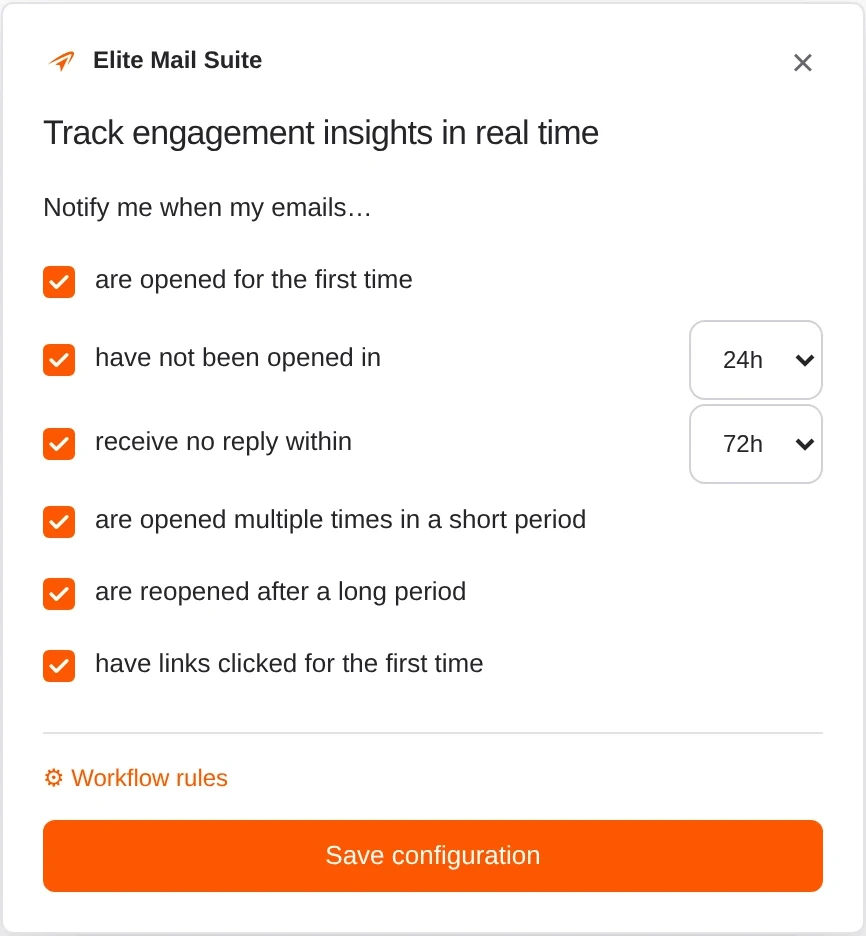
Elite extension notification preferences, with a switch for each kind of alert

Get started

Choose one conversation you don’t want to lose

Choose a waiting period and a next action: a reminder, a provider draft, or an authorized automatic follow-up. Set stop rules before turning it on.

  1. Choose the next step

    Set a reminder, or choose a draft or automatic send where your provider supports it

  2. Set timing and conditions

    Choose when to act and which available activity should trigger the step

  3. Review Gmail™ sequences

    A multi-step Gmail™ sequence requires explicit acknowledgement with automatic reply/bounce stops disabled

  4. Manage the follow-up

    Review queued messages, honor opt-outs, and cancel a sequence when plans change

Create a free account. Available on Pro.

Build your first workflowBuild your first follow-up

Use cases

Keep the right conversations from going quiet

Spend less of your day remembering who needs a reply

01

Scheduled check-ins

Bring a conversation back after a day, a few days, or a week

02

Waiting for an answer

Use Outlook reply-aware reminders when a response is the next milestone

03

Returning activity

Review new activity on an older message before deciding whether to reconnect

What's included

  • Outlook reply-aware rules
  • Fresh Gmail™ send-only sequences
  • Explicit stop-rule acknowledgement
  • Open and click conditions
  • Opt-out and suppression checks

Good to know

Clear about the limits

We would rather you trust Elite than be surprised by it. These are the boundaries worth knowing before you rely on it.

Security and privacy at Elite

  1. No recorded open does not prove that a message is unread. Repeated activity is context, not proof of interest.

Keep going

Works better together

Every Elite feature shares the same contacts, messages and history, so the next step is already in context

Elite Email Tracker

See opens and clicks with context about automated activity

Explore

Email Templates

Save and share the messages your team uses most

Explore

CRM for Email

Keep contacts and conversations together

Explore

Questions

Follow-up Reminders FAQ

Answers about setup, compatibility, privacy, and day-to-day use

Visit the help center

Will Gmail™ automatically stop when someone replies?

No. Gmail™ cloud sequences cannot detect replies or bounces. Check the conversation yourself before continuing follow-ups.

Can I use reply-aware workflows with Outlook?

Yes. Connected Outlook supports reply detection, provider drafts, and in-thread follow-ups.

Get started

Give your next conversation a follow-up date

Spend less of your day remembering who needs a reply

Build your first workflowCompare plansView all features
Elite Mail WorksElite Mail Works
Email TrackerWorkflowsSolutionsPricing
Log inStart free

Tracking

Elite Email TrackerFollow-up RemindersEmail Analytics

Outreach

CampaignsMail MergeEmail TemplatesVideo Messages

Requests & documents

Document RequestsVideo RequestsSignature RequestDocuments overviewDocument TrackingSecure Document SharingConfidential Watermark

Workspace

CRM for EmailTracker BlockingWorkflowsIntegrationsAI connections

Get Elite Mail Works

Chrome ExtensionEdge ExtensionFirefox ExtensionGmail™ Mobile Add-onOutlook Add-iniPhone & iPad AppAndroid App

Resources

BlogSign PDF OnlineSignature StudioEmail signature templatesGmail™ signature generatorOutlook signature generatorVideo RecorderEmail Tracking GuideWorkflow ExamplesTutorialsCustom EmailFAQs & Help CenterComparisons
View all features
Product
Elite Email TrackerFollow-up RemindersEmail AnalyticsCampaignsMail MergeEmail TemplatesVideo MessagesDocument RequestsVideo RequestsSignature RequestDocuments overviewDocument TrackingSecure Document SharingConfidential WatermarkCRM for EmailTracker BlockingWorkflowsIntegrationsAI connections
Download
Chrome ExtensionEdge ExtensionFirefox ExtensionGmail™ Mobile Add-onOutlook Add-iniPhone & iPad AppAndroid App
Resources
BlogSign PDF OnlineSignature StudioEmail signature templatesGmail™ signature generatorOutlook signature generatorVideo RecorderEmail Tracking GuideWorkflow ExamplesTutorialsCustom Email
WorkflowsSolutionsPricing
Log inStart free
Ask about Elite Mail Works on
Elite Mail WorksElite Mail Works
  • Download on the App Store
  • Get it on Google Play

Company

ContactAbout UsBrandingCareersPress

Features

Elite Email TrackerFollow-up RemindersEmail AnalyticsCampaignsMail MergeEmail TemplatesVideo MessagesDocument TrackingSecure Document SharingConfidential WatermarkSignature RequestCRM for EmailTracker BlockingDocument RequestsVideo Requests

Solutions

StartupsLawyers & AttorneysFreelancersHRTeachers & ProfessorsReal EstateMarketersSmall BusinessSales ProfessionalsAccountantsElite Mail Works for TeamsProposal Software

Download

Chrome ExtensionEdge ExtensionFirefox ExtensionGmail™ Mobile Add-onOutlook Add-iniPhone & iPad AppAndroid App

Resources

BlogSign PDF OnlineSignature StudioEmail signature templatesGmail™ signature generatorOutlook signature generatorVideo RecorderEmail Tracking GuideWorkflow ExamplesTutorialsCustom EmailWorkflowsDocuments overviewAI actionsIntegrationsEnterprisePricingFAQsComparisonsPrivacyTermsSecurity
  • Available in the Chrome Web Store
  • Add to Slack
  • Available on Microsoft Marketplace: Outlook add-in
  • Get it from Microsoft Edge
  • Get the Firefox add-on
  • Get it from Google Workspace Marketplace: Gmail add-on
  • Powered by AWS: system email delivery using Amazon SES
  • Protected by Cloudflare
  • Powered by Stripe: payment processing
  • elitemailsuite.com: green hosting through Cloudflare, checked by Green Web Foundation
  • Product HuntFind us onProduct Hunt

© 2026 Elite Mail Works. All rights reserved.

Gmail™, Google Workspace, Chrome, and Android are trademarks of Google LLC. Microsoft, Microsoft Edge, and Outlook are trademarks of the Microsoft group of companies. Yahoo and Yahoo Mail are trademarks of Yahoo Inc. Elite Mail Works is an independent product and is not affiliated with or endorsed by these companies.