Home/Email Tracker/Outlook

Email tracker for Outlook · Elite Email TrackerEmail tracking for Outlook

Track important messages, review activity, work with follow-ups, and keep Elite context connected across Outlook on Windows, Mac, and the web

Get Elite for OutlookStart tracking free
Outlook on Windows, Mac, and the web · Outlook.com, Hotmail, and Microsoft 365See how it works
Email tracking for Outlook in the Elite Mail Works dashboard: tracked messages, engagement over time and the signal mix
  • Know what happens after Send

    Review opens, clicks, repeat engagement, and the activity behind the conversation before following up

  • Work where Outlook already lives

    Use the Outlook add-in on Windows, Mac, and the web, or the browser extension in Outlook webmail

  • Keep the next step connected

    Bring message history, contact context, follow-ups, documents, and signature progress into the same Elite workspace

Works with Outlook Gmail Yahoo Mail

Why it mattersInside OutlookSetupGood to knowFAQ

Why it matters

Outlook tells you a message was sent. Elite tells you what happened next.

Outlook read receipts depend on the recipient choosing to send one, and say nothing about links

Outlook on its own

  • Sent, then silenceNo record of whether the message was opened.
  • No link activityYou cannot tell which link drew attention.
  • Follow-ups from memoryNothing resurfaces a conversation that went quiet.

With Elite in Outlook

  • Opens and clicks recordedFor the messages you choose to track.
  • Classified signalsLikely-human activity kept apart from automated requests.
  • A clear next stepReminders and history beside the conversation.

Inside Outlook

Prepare your next conversation

A link click, a return visit, or a quiet timeline can help you prepare the next conversation

01In your sent mail

See which Outlook messages were opened

Tracked messages show their status beside the subject in Outlook. Hover for the latest activity, or open the message for the full history.

  • Status at a glance. Sent, opened or clicked, without leaving the inbox.
  • Per-message control. Turn tracking off for any email before you send it.
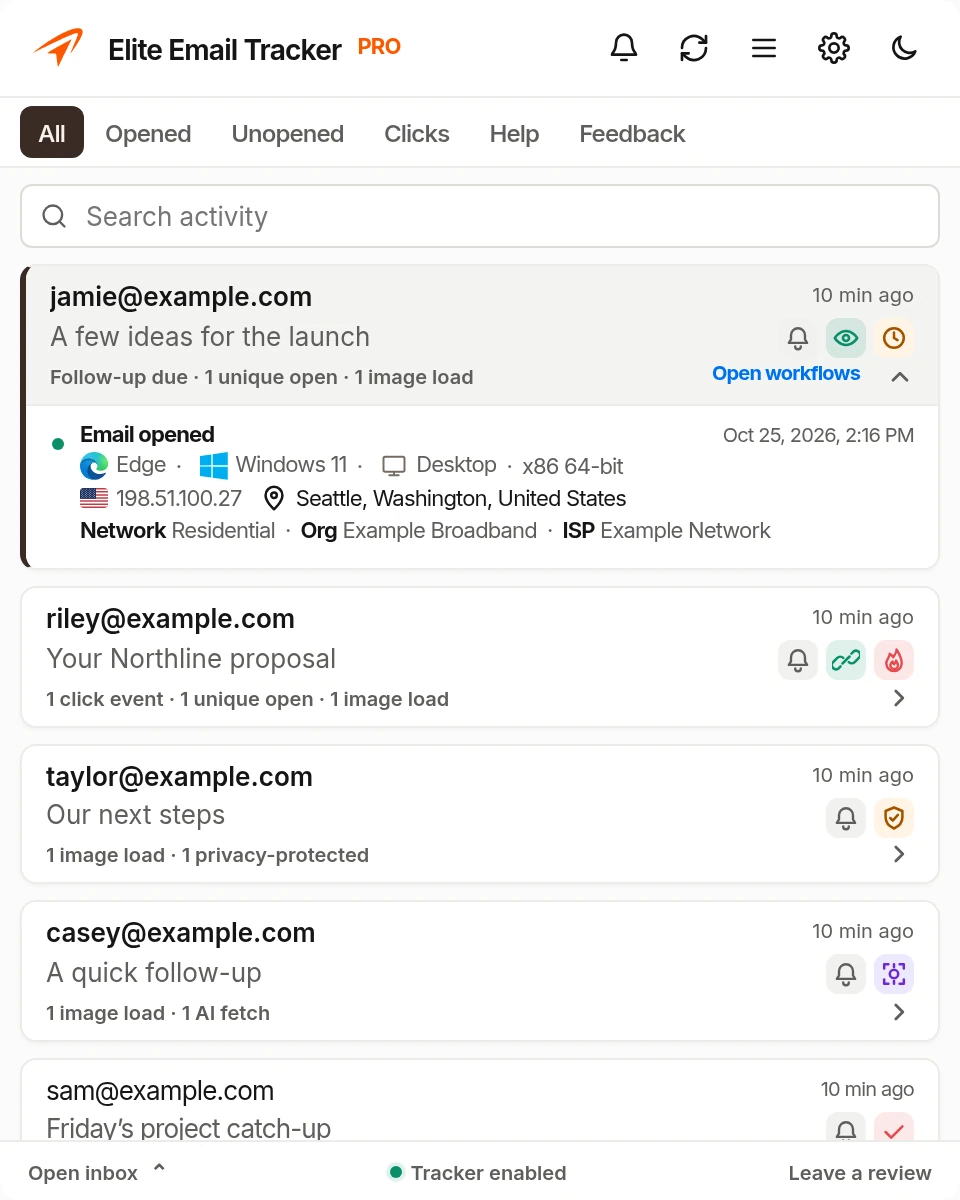
Elite browser extension listing tracked messages, with one open expanded to show browser, operating system, device, location and network

02Timeline

A timeline for every tracked message

Each open and link click is listed with its time and classification, so you can see the order things happened in and how recently

  • Every event in order. Opens, clicks and replies where your provider supports them.
  • Recency matters. A return visit today tells you more than an open last week.
Email activity report for one message: recipients, send status, three opens, three clicks and a timeline of each signal with browser, device, location and network

03Links

Know which links were clicked

Tracked links record a click when someone follows them. A click is a stronger signal than an open, because it takes a deliberate action.

  • Per-link counts. See which link in the message drew the click.
  • Useful for proposals. Pair with document tracking for page-level detail.
Link clicks report listing each click with the recipient, message subject, destination, device, location and time

04Signal quality

Signals you can trust

Elite labels privacy protection, image proxies, scanners, sender activity, and uncertain events. An open is context, not proof that someone read your email.

  • Classified, not inflated. Automated requests are labelled rather than counted as reads.
  • Your own opens excluded. Views from your devices are marked as sender activity.
Signal mix chart: 95 signals split into email engagement, privacy protected, security scanner, AI activity and suppressed self views

*Open tracking records image requests, not proof that a person read or understood a message. Privacy services and security scanners remain separate from email engagement.

Setup

How tracking works in Outlook

Outlook on Windows, Mac, and the web · Outlook.com, Hotmail, and Microsoft 365

  1. Install your Outlook client

    Get the Outlook add-in for Windows, Mac, or the web. Organizations deploy it through Microsoft 365 Integrated Apps. For webmail, Chrome, Edge, and Firefox extensions also work.

  2. Connect your Elite account

    Sign in once from the add-in or authorize the browser installation. Connect mailbox access for the workflows you choose.

  3. Track this message

    Choose Track this message in the add-in. The web extension tracks sends automatically; when both are installed, they share one tracking record.

Get Elite for OutlookInstallation guide

Good to know

Outlook workflow support

What Elite can and cannot do with this provider

  1. Connect Outlook mailbox permissions for reply-aware workflows and provider drafts. The add-in and web extension reconcile to one tracked message.
  2. The add-in and browser extension use their own compose controls and reconcile to one tracked message
  3. Microsoft privacy services and enterprise security scanners can request images or links before a person reads the email. Elite keeps those requests separate from likely-human activity.
  4. Blocked images can leave no open signal, and privacy services can create requests without someone reading the message

Go further

More to do from Outlook

Email tracking

How opens and clicks are recorded and classified

Learn more

Follow-up reminders

Resurface conversations that went quiet

Learn more

Email templates

Reuse your best messages from compose

Learn more

Mail merge

Individualized campaigns from Gmail and Outlook

Learn more

Document tracking

Page-by-page analytics for shared files

Learn more

Tracker blocking

Block known trackers in incoming email

Learn more

Questions

Outlook email tracking FAQ

Answers about setup, compatibility, and everyday use

Email tracker for GmailEmail tracker for Yahoo Mail

Can I track email opens in Outlook?

Yes. Elite Email Tracker works with Outlook.com, Hotmail, Microsoft 365, and Outlook on the web. The Outlook add-in also tracks messages on Windows and Mac.

Is Elite Email Tracker the same as an Outlook read receipt?

An Outlook read receipt asks the recipient’s system or user to return a receipt. Elite records and classifies remote-image and tracked-link requests across providers.

Does Outlook tracking show the recipient’s exact location?

Location is approximate network context. Microsoft proxies, enterprise gateways, VPNs, and mobile networks can hide or change the apparent source. Elite labels privacy and scanner activity separately.

Will tracking block an Outlook add-in send?

The Outlook add-in does not block a send when reconciliation is unavailable. The browser extension verifies its marker and asks before an untracked send if registration or verification fails.

Get started

Send your next Outlook message with better context

Outlook on Windows, Mac, and the web · Outlook.com, Hotmail, and Microsoft 365

Get Elite for OutlookCompare plansAll downloads
Elite Mail WorksElite Mail Works
Email TrackerWorkflowsSolutionsPricing
Log inStart free

Tracking

Elite Email TrackerFollow-up RemindersEmail Analytics

Outreach

CampaignsMail MergeEmail TemplatesVideo Messages

Requests & documents

Document RequestsVideo RequestsSignature RequestDocuments overviewDocument TrackingSecure Document SharingConfidential Watermark

Workspace

CRM for EmailTracker BlockingWorkflowsIntegrationsAI connections

Get Elite Mail Works

Chrome ExtensionEdge ExtensionFirefox ExtensionGmail™ Mobile Add-onOutlook Add-iniPhone & iPad AppAndroid App

Resources

BlogSign PDF OnlineSignature StudioEmail signature templatesGmail™ signature generatorOutlook signature generatorVideo RecorderEmail Tracking GuideWorkflow ExamplesTutorialsCustom EmailFAQs & Help CenterComparisons
View all features
Product
Elite Email TrackerFollow-up RemindersEmail AnalyticsCampaignsMail MergeEmail TemplatesVideo MessagesDocument RequestsVideo RequestsSignature RequestDocuments overviewDocument TrackingSecure Document SharingConfidential WatermarkCRM for EmailTracker BlockingWorkflowsIntegrationsAI connections
Download
Chrome ExtensionEdge ExtensionFirefox ExtensionGmail™ Mobile Add-onOutlook Add-iniPhone & iPad AppAndroid App
Resources
BlogSign PDF OnlineSignature StudioEmail signature templatesGmail™ signature generatorOutlook signature generatorVideo RecorderEmail Tracking GuideWorkflow ExamplesTutorialsCustom Email
WorkflowsSolutionsPricing
Log inStart free
Ask about Elite Mail Works on
Elite Mail WorksElite Mail Works
  • Download on the App Store
  • Get it on Google Play

Company

ContactAbout UsBrandingCareersPress

Features

Elite Email TrackerFollow-up RemindersEmail AnalyticsCampaignsMail MergeEmail TemplatesVideo MessagesDocument TrackingSecure Document SharingConfidential WatermarkSignature RequestCRM for EmailTracker BlockingDocument RequestsVideo Requests

Solutions

StartupsLawyers & AttorneysFreelancersHRTeachers & ProfessorsReal EstateMarketersSmall BusinessSales ProfessionalsAccountantsElite Mail Works for TeamsProposal Software

Download

Chrome ExtensionEdge ExtensionFirefox ExtensionGmail™ Mobile Add-onOutlook Add-iniPhone & iPad AppAndroid App

Resources

BlogSign PDF OnlineSignature StudioEmail signature templatesGmail™ signature generatorOutlook signature generatorVideo RecorderEmail Tracking GuideWorkflow ExamplesTutorialsCustom EmailWorkflowsDocuments overviewAI actionsIntegrationsEnterprisePricingFAQsComparisonsPrivacyTermsSecurity
  • Available in the Chrome Web Store
  • Add to Slack
  • Available on Microsoft Marketplace: Outlook add-in
  • Get it from Microsoft Edge
  • Get the Firefox add-on
  • Get it from Google Workspace Marketplace: Gmail add-on
  • Powered by AWS: system email delivery using Amazon SES
  • Protected by Cloudflare
  • Powered by Stripe: payment processing
  • elitemailsuite.com: green hosting through Cloudflare, checked by Green Web Foundation
  • Product HuntFind us onProduct Hunt

© 2026 Elite Mail Works. All rights reserved.

Gmail™, Google Workspace, Chrome, and Android are trademarks of Google LLC. Microsoft, Microsoft Edge, and Outlook are trademarks of the Microsoft group of companies. Yahoo and Yahoo Mail are trademarks of Yahoo Inc. Elite Mail Works is an independent product and is not affiliated with or endorsed by these companies.